About Me
Mod Version: 1.01, by Tasking Mickey
| vB Version: 3.8.7 | Rating:  (0 vote - 0 average) (0 vote - 0 average) |
Installs: 2 |
| Released: 14 May 2011 | Last Update: 14 May 2011 | Downloads: 34 |
 Not Supported Not Supported
 Uses Plugins
Auto-Template
Code Changes Uses Plugins
Auto-Template
Code Changes
|
||
Before I do anything (always say this) I want to thank a friend of mine named Fat Mcstink to letting me use the code, and giving me the code to use in this product.
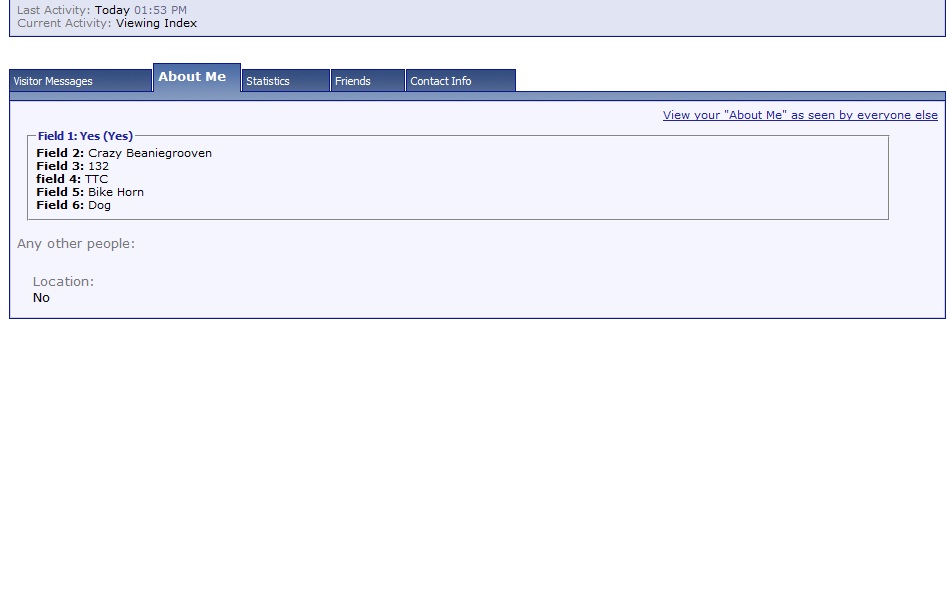
You notice on the About Me page in your profile, the profile sets are in dropdown mode? well, this puts all the fields "Peron's Name: Laff" all that into it's own box, along with the second one, if you do have one.
== INSTALL ==
1. - Navigate over to ACP - Plugins and Products - Upload new Product
2. Import the product after you have downloaded it.
3. Once product is officially imported, go over to ACP - Style Managers - (Your style) - Edit Templates - MEMBERINFO - memberinfo_block_aboutme
4. - Go to where it says
and replace it with
And that's it, it will put all your current profile fields into boxes.
NOTE:
If you want to edit the "Name Here" the "Field 1" and all that, go to the template
as that is the main source and edit the field numbers, the field names on your basis.
UNINSTALL
To uninstall the product, first go to ACP - Plugins and Products, go to the product About Me and uninstall.
Then, go to the template memberinfo_block_aboutme and replace
with
and your good to back to normal.
Any questions just post in this thread.
Enjoy everybody!
You notice on the About Me page in your profile, the profile sets are in dropdown mode? well, this puts all the fields "Peron's Name: Laff" all that into it's own box, along with the second one, if you do have one.
== INSTALL ==
1. - Navigate over to ACP - Plugins and Products - Upload new Product
2. Import the product after you have downloaded it.
3. Once product is officially imported, go over to ACP - Style Managers - (Your style) - Edit Templates - MEMBERINFO - memberinfo_block_aboutme
4. - Go to where it says
PHP Code:
$block_data[fields]
PHP Code:
$show[newaboutme]
NOTE:
If you want to edit the "Name Here" the "Field 1" and all that, go to the template
HTML Code:
memberinfo_block_aboutmetemplate
UNINSTALL
To uninstall the product, first go to ACP - Plugins and Products, go to the product About Me and uninstall.
Then, go to the template memberinfo_block_aboutme and replace
PHP Code:
$show[newaboutme]
PHP Code:
$block_data[fields]
Any questions just post in this thread.
Enjoy everybody!
Download
 product-aboutme.xml (3.3 KB, 30 downloads)
Screenshots