Put Your Logo on CSS [vBulletin]
Mod Version: 1.00, by LOGECT
| vB Version: 4.x.x | Rating:  (9 votes - 5.00 average) (9 votes - 5.00 average) |
Installs: 34 |
| Released: 27 Mar 2011 | Last Update: Never | Downloads: 0 |
 Not Supported Not Supported
 Template Edits
Re-usable Code Template Edits
Re-usable Code
|
||
Info:
Put your vBulletin logo on CSS, this can optimize your pages load time.
http://www.logect.com/
Installation:
1- Add the code below in the additional.css template
Red: You will need to change it with your own logo url and other options ...
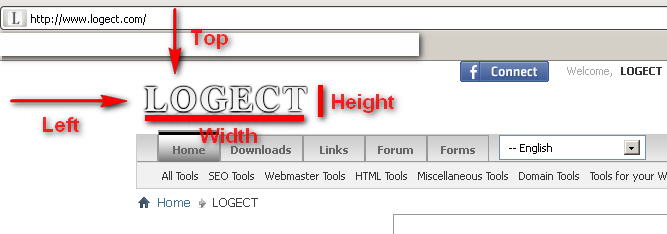
2- Find and replace the code below in the header template:
With:
use following code, if you are using the vbulletin suite version.
Note: it works fine with any version of vBulletin.
Put your vBulletin logo on CSS, this can optimize your pages load time.
http://www.logect.com/
Installation:
1- Add the code below in the additional.css template
Code:
#vbulletin_logo {
background-image: url(http://www.YOURWEBSITE.com/images/logo.png);
display:block;
background-repeat: no-repeat;
text-indent:-9999px;
height:73px;
width:183px;
position:relative;
left:5px;
top:22px;
}
2- Find and replace the code below in the header template:
Code:
<a name="top" href="{vb:link forumhome}" class="logo-image"><img src="{vb:stylevar titleimage}" alt="{vb:rawphrase x_powered_by_vbulletin, {vb:raw vboptions.bbtitle}}" /></a>
Code:
<a href="{vb:link forumhome}{vb:raw session.sessionurl_q}" title="YOUR TITLE" id="vbulletin_logo">YOUR WEBSITE NAME</a>
use following code, if you are using the vbulletin suite version.
Code:
<a href="{vb:raw vboptions.homeurl}{vb:raw session.sessionurl_q}" title="YOUR TITLE" id="vbulletin_logo">YOUR WEBSITE NAME</a>
Download
No files for download.
Supporters / CoAuthors
- LOGECT
Screenshots