Smilies on Quick Reply/Quick Edit
Mod Version: 1.00, by Lairston
| vB Version: 4.0.4 | Rating:  (13 votes - 4.85 average) (13 votes - 4.85 average) |
Installs: 105 |
| Released: 18 Jul 2010 | Last Update: Never | Downloads: 0 |
 Not Supported Not Supported
 Template Edits Template Edits
|
||
After some tinkering I was able to get the smilies on the Quick edit/reply on my dev site with just two template modifications.
If you would like smilies on the quick edit open the postbit_quickedit template
Find the following code
Paste after that code the following
If you would like the smilies on the quick reply on threads page, open the showthread_quickreply template
Find the following code
Paste the following after that code:
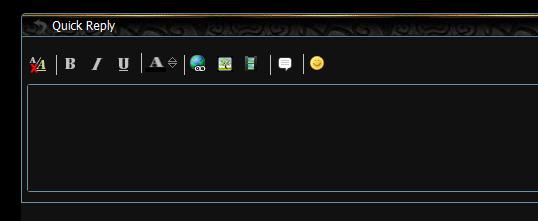
If you would like smilies on the quick edit open the postbit_quickedit template
Find the following code
Code:
<vb:if condition="$show['quote_bbcode']">
<li>
<img src="{vb:stylevar imgdir_editor}/quote.png" class="imagebutton" id="{vb:raw editorid}_cmd_wrap0_quote" width="21" height="20" alt="{vb:rawphrase wrap_quote_tags}" />
</li>
</vb:if>
Code:
<li>
            <a href="javascript://" onclick="vB_Editor['{vb:raw editorid}'].open_smilie_window(smiliewindow_x, smiliewindow_y); return false"><img src="{vb:stylevar imgdir_editor}/smilie.png" alt="Smilies" border="0" /></a>
</li>
Find the following code
Code:
<vb:if condition="$show['quote_bbcode']">
<li class="editor_control_group_item">
   <img src="{vb:stylevar imgdir_editor}/quote.png" class="imagebutton" id="{vb:raw editorid}_cmd_wrap0_quote" width="20" height="20" alt="{vb:rawphrase wrap_quote_tags}" />
</li>
</vb:if>
Code:
<li class="editor_control_group_item">
 <a href="javascript://" onclick="vB_Editor['{vb:raw editorid}'].open_smilie_window(smiliewindow_x, smiliewindow_y); return false"><img src="{vb:stylevar imgdir_editor}/smilie.png" alt="Smilies" border="0" /></a>
</li>
Download
No files for download.
Screenshots