Gamercard in Profiles
Mod Version: 2.0, by TheInsaneManiac
| vB Version: 3.8.x | Rating:  (1 vote - 5.00 average) (1 vote - 5.00 average) |
Installs: 13 |
| Released: 15 Oct 2009 | Last Update: 04 Nov 2009 | Downloads: 94 |
 Not Supported Not Supported
 Uses Plugins
Auto-Template Uses Plugins
Auto-Template
|
||
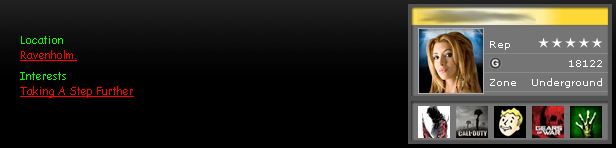
Display your gamercard in your profiles with ease. Gamercards will display under the about tab in profiles.
Installation:
1.) In the AdminCP go to User Profile Fields -> Add New User Profile Field.
2.) Select Single-Line Text Box.
3.) Apply the following settings:
Title:
Gamertag
Description:
Put your Xbox Live Gamertag here.
Max length of allowed user input:
16
Field Required:
No
Private Field:
No
Field Searchable on Members List:
Yes
Show on Members List:
No
4.) After saving take note of what the ID is of the field.
5.) In the AdminCP under Gamertag Profile put the ID in there.
Ex: field123
Optional:
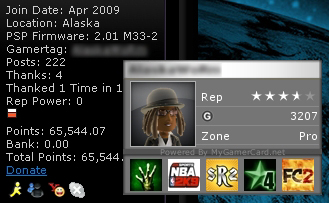
You can now view gamercards in posts by hovering over their gamertag. See screenshot for better explanation.
To do this go into your headinclude template and find:
<!-- / CSS Stylesheet -->
Below add:
$gamercardinpostbit
In postbit find:
<if condition="$post['age']"><div>$vbphrase[age]: $post[age]</div></if>
Add the following code after, be sure to change XX to your gamertag field ID:
<if condition="$post['fieldXX']"><div">$vbphrase[gamertag]: <a href="http://profile.mygamercard.net/$post[fieldXX]" target="_blank" onmouseover="return overlibImage('', 'http://card.mygamercard.net/$post[fieldXX].png');" onmouseout="return overlibMouseout();">$post[fieldXX]</a></div></if>
FAQ:
Question: I get a "Parse error: syntax error, unexpected ']', expecting T_STRING or T_VARIABLE or T_NUM_STRING" error.
Answer: You did not fill in your profile field correctly or at all.
Known Issues:
Gamercard will not display if gamertags have spaces. -Fix being worked on
Upgrading:
Import the product and select Allow Overwrite.
Changelog:
2.0 - Fixed a bug which prevented the gamercard script from running in the postbit.
1.8 - Fixed a bug that prevented gamercards to show in profiles.
1.5 - Added the ability to see the gamercard via posts.
1.0 - Release
Installation:
1.) In the AdminCP go to User Profile Fields -> Add New User Profile Field.
2.) Select Single-Line Text Box.
3.) Apply the following settings:
Title:
Gamertag
Description:
Put your Xbox Live Gamertag here.
Max length of allowed user input:
16
Field Required:
No
Private Field:
No
Field Searchable on Members List:
Yes
Show on Members List:
No
4.) After saving take note of what the ID is of the field.
5.) In the AdminCP under Gamertag Profile put the ID in there.
Ex: field123
Optional:
You can now view gamercards in posts by hovering over their gamertag. See screenshot for better explanation.
To do this go into your headinclude template and find:
<!-- / CSS Stylesheet -->
Below add:
$gamercardinpostbit
In postbit find:
<if condition="$post['age']"><div>$vbphrase[age]: $post[age]</div></if>
Add the following code after, be sure to change XX to your gamertag field ID:
<if condition="$post['fieldXX']"><div">$vbphrase[gamertag]: <a href="http://profile.mygamercard.net/$post[fieldXX]" target="_blank" onmouseover="return overlibImage('', 'http://card.mygamercard.net/$post[fieldXX].png');" onmouseout="return overlibMouseout();">$post[fieldXX]</a></div></if>
FAQ:
Question: I get a "Parse error: syntax error, unexpected ']', expecting T_STRING or T_VARIABLE or T_NUM_STRING" error.
Answer: You did not fill in your profile field correctly or at all.
Known Issues:
Gamercard will not display if gamertags have spaces. -Fix being worked on
Upgrading:
Import the product and select Allow Overwrite.
Changelog:
2.0 - Fixed a bug which prevented the gamercard script from running in the postbit.
1.8 - Fixed a bug that prevented gamercards to show in profiles.
1.5 - Added the ability to see the gamercard via posts.
1.0 - Release
Download
 Gamercard in Profiles 2.0.zip (17.0 KB, 63 downloads)
Screenshots