Advanced Forum Navbar
Mod Version: 1.0, by Coroner
| vB Version: 3.8.2 | Rating:  (2 votes - 5.00 average) (2 votes - 5.00 average) |
Installs: 22 |
| Released: 02 Aug 2009 | Last Update: 06 Aug 2009 | Downloads: 251 |
 Not Supported Not Supported
 DB Changes
Uses Plugins
Template Edits
Code Changes
Translations DB Changes
Uses Plugins
Template Edits
Code Changes
Translations
|
||
The original mod was created years ago for the wBB (Woltlab Burning Board) and was called "Advanced Forum Header".
This Mod will install an advanced navbar with user and forum informations.
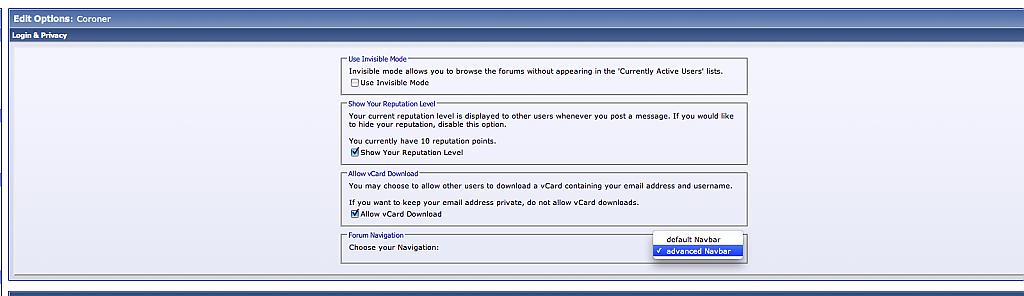
The user have the ability to choose between the "default" and "advanced" navbar into his UserCP.
This mod needs code changes and adds a few queries for every page in the forum.
Take a look into the READ.ME for the code changes (it will add a HOOK in the fetch_template function).
FAQ's
All my users should have the advanced navbar for default.
Answer: Open the product.xml and locate the installcode. You will found a default value '0'. Simply change it into '1' und install the product.
How can I add more navbar's?
Answer: The advanced navbar template is called "afn_navbar_1". Simply create a template (for example: "afn_navbar_2") and place it into the product.
Next take a look into the template "afn_usercp_option". You will found an option menu like this:
You need to change those option into:
All navbar templates needs a unique number at it's end ("afn_navbar_X"). Where X is the option number.
edit: 03.08.2009
Changed the product and add a new plugin to fix the "mostest online users".
edit: 04.08.2009
Fixed a problem with vBA and/or vBCMS
This Mod will install an advanced navbar with user and forum informations.
The user have the ability to choose between the "default" and "advanced" navbar into his UserCP.
This mod needs code changes and adds a few queries for every page in the forum.
Take a look into the READ.ME for the code changes (it will add a HOOK in the fetch_template function).
FAQ's
All my users should have the advanced navbar for default.
Answer: Open the product.xml and locate the installcode. You will found a default value '0'. Simply change it into '1' und install the product.
How can I add more navbar's?
Answer: The advanced navbar template is called "afn_navbar_1". Simply create a template (for example: "afn_navbar_2") and place it into the product.
Next take a look into the template "afn_usercp_option". You will found an option menu like this:
Code:
<option value="0" $afn[0]>$vbphrase[afn_navbar_chooser1]</option>
<option value="1" $afn[1]>$vbphrase[afn_navbar_chooser2]</option>
Code:
<option value="0" $afn[0]>$vbphrase[afn_navbar_chooser1]</option>
<option value="1" $afn[1]>$vbphrase[afn_navbar_chooser2]</option>
<option value="2" $afn[2]>my 3rd navbar</option>
edit: 03.08.2009
Changed the product and add a new plugin to fix the "mostest online users".
edit: 04.08.2009
Fixed a problem with vBA and/or vBCMS
Download
 advanced_forum_navbar.zip (28.0 KB, 226 downloads)
Screenshots