Sliding login panel with jQuery 1.5 (updated)
Mod Version: 1.00, by Andy69
| vB Version: 3.8.2 | Rating:  (1 vote - 5.00 average) (1 vote - 5.00 average) |
Installs: 44 |
| Released: 21 Jul 2009 | Last Update: Never | Downloads: 522 |
 Not Supported Not Supported
|
||
version 1.0 Works With All VBulletin Versions
Sliding login panel with jQuery 1.5
updated version added in below posts
Description:
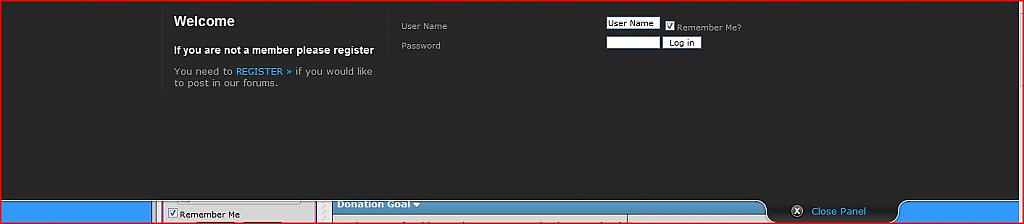
this Will, Add A Login In The Head Of Your Forum. With The Power Of JQuery, You Are Now Able To Slide Up and Down, The Login Panel. This A Very PowerFul Tool For A Quick Login
Installation Steps:
1. Upload All the Files In The Correct Place, Example:
The Css Folder Will Go In The Root Of You Forum, Everything In The Clientscript Folder There Will Be Two Files, They Will Go In Your Default Clientscript Folder From You Forum, And The Images Folder, You
Will Do the Same As The Clientscript Folder , But Only This Time, This Will Be The Images Folder From Your Default
2. Templates Edits
Now Is The Part Were To Add The Code,
From All The Files, You Should Have Got , A Text File Called , "Your Code" Open That With Any Text Editor Like NotePad.
Now Go To Your AdminCp And Go To Styles & Templates Then Click, Style Manager, Then Click Edit Templates
Now Look For "header"
At The Very Top Add The code that Is Provided, From the Text file Called " Your Code"
Then Hit Save, But If You Want You Can Do IT For All Your Skins
3. Now Your Are Going To Notice That The BackGround doesn't Match Your Skin
In The Css Folder You'll Find, A File Called "Style.css" Open It With A
Text Editor Like NotePad. Now Thats Its Open Look For
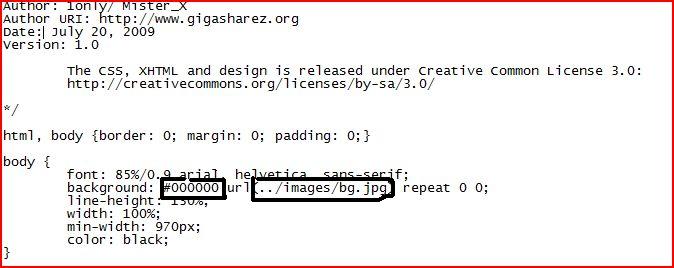
body {
font: 85%/0.9 arial, helvetica, sans-serif;
background: #000000 url(../images/bg.gif) repeat 0 0;
line-height: 130%;
width: 100%;
min-width: 970px;
color: black;
}
From There You'll See background: #000000 , You Need To Chage The Color Code To From #000000 With Your Skin's Color, So IT Match's It
If You Don't Do This Then The Color Won't Change.
4. Now In The Images Folder You'll See A File Called, "bg" , You Need To Change That With Your Skins BackGround Image, If Not It Will Also Not Change Or Match Your Skin's BackGround Image.
5. If Any Issues, Please Look A The ScreenShots
6. Thats It Your Done, You Now Have Sliding login panel with jQuery
This Was Developed By 1Only And Mister_X
demo here :
http://sitetest1234.selfip.com/forums/
screen shots attached
Sliding login panel with jQuery 1.5
updated version added in below posts
Description:
this Will, Add A Login In The Head Of Your Forum. With The Power Of JQuery, You Are Now Able To Slide Up and Down, The Login Panel. This A Very PowerFul Tool For A Quick Login
Installation Steps:
1. Upload All the Files In The Correct Place, Example:
The Css Folder Will Go In The Root Of You Forum, Everything In The Clientscript Folder There Will Be Two Files, They Will Go In Your Default Clientscript Folder From You Forum, And The Images Folder, You
Will Do the Same As The Clientscript Folder , But Only This Time, This Will Be The Images Folder From Your Default
2. Templates Edits
Now Is The Part Were To Add The Code,
From All The Files, You Should Have Got , A Text File Called , "Your Code" Open That With Any Text Editor Like NotePad.
Now Go To Your AdminCp And Go To Styles & Templates Then Click, Style Manager, Then Click Edit Templates
Now Look For "header"
At The Very Top Add The code that Is Provided, From the Text file Called " Your Code"
Then Hit Save, But If You Want You Can Do IT For All Your Skins
3. Now Your Are Going To Notice That The BackGround doesn't Match Your Skin
In The Css Folder You'll Find, A File Called "Style.css" Open It With A
Text Editor Like NotePad. Now Thats Its Open Look For
body {
font: 85%/0.9 arial, helvetica, sans-serif;
background: #000000 url(../images/bg.gif) repeat 0 0;
line-height: 130%;
width: 100%;
min-width: 970px;
color: black;
}
From There You'll See background: #000000 , You Need To Chage The Color Code To From #000000 With Your Skin's Color, So IT Match's It
If You Don't Do This Then The Color Won't Change.
4. Now In The Images Folder You'll See A File Called, "bg" , You Need To Change That With Your Skins BackGround Image, If Not It Will Also Not Change Or Match Your Skin's BackGround Image.
5. If Any Issues, Please Look A The ScreenShots
6. Thats It Your Done, You Now Have Sliding login panel with jQuery
This Was Developed By 1Only And Mister_X
demo here :
http://sitetest1234.selfip.com/forums/
screen shots attached
Download
 sliding-login.zip (37.2 KB, 533 downloads)
Screenshots