WC's Affiliate Footer Table Mod
Mod Version: 1.00, by sherwood
| vB Version: 3.8.x | Rating:  (2 votes - 5.00 average) (2 votes - 5.00 average) |
Installs: 31 |
| Released: 10 Jul 2009 | Last Update: Never | Downloads: 142 |
 Not Supported Not Supported
 Uses Plugins
Template Edits
Additional Files
Translations Uses Plugins
Template Edits
Additional Files
Translations
|
||
I hear lots of people always asking 'How do you get a affiliate table in your footer?' and since some people don't no any html/php/ect they don't know so I've created a simple way for you to have a Affiliate Footer Table without you having to do anything apart from changing a few things in VB Options.
What does it do?
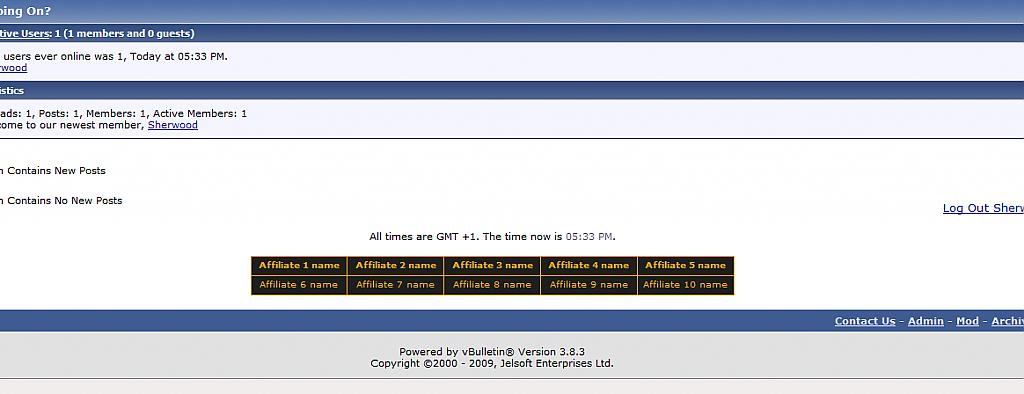
What this mod does is adds a table in your footer where you can add links to affiliating sites.
Screenshot:

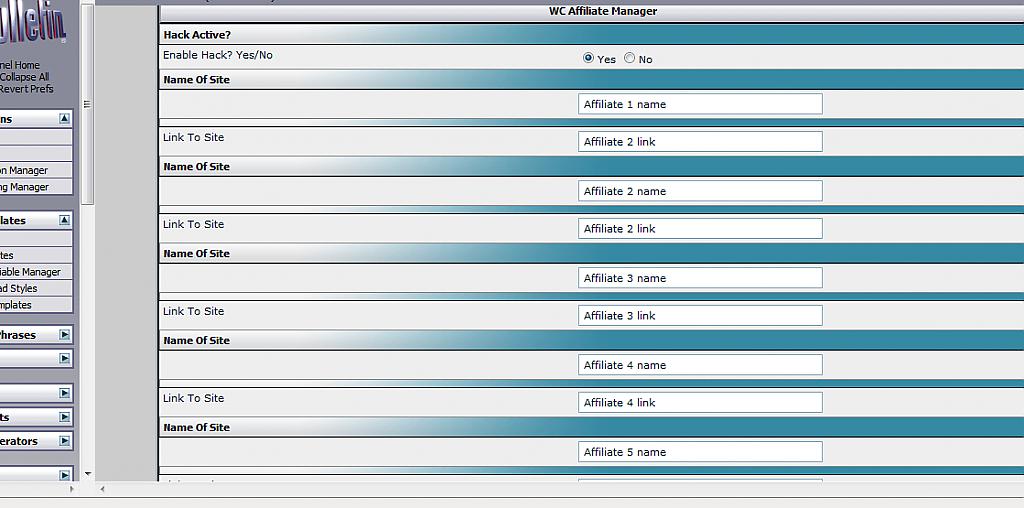
This is what it will look like from admin CP side:
How to install:
How do I change the colors of the affiliate table?
Go to Styles & Templates > Style Manager > Edit Templates > wc_affiliate
To change the color of the border find:
and change the color code that I've highlighted red.
To change the color of the text when the mouse is not over the cell find:
and change the color code that I've highlighted red.
To change the color of the cell background when the mouse is not over the cell find:
and change the color code that I've highlighted red.
To change the color of the text when the mouse is over the cell find:
and change the color code that I've highlighted red.
To change color of the cell background when the is over the cell find:
and change the color code that I've highlighted red.
Please mark as Installed before asking for support
What does it do?
What this mod does is adds a table in your footer where you can add links to affiliating sites.
Screenshot:
This is what it will look like from admin CP side:
How to install:
- Go to AdminCP > Plugins & Products > Manage Products > [Add/Import Product] then import product-wc_affiliatemanager.xml
- Go to your footer template and find:
After add:PHP Code:<div class="smallfont" align="center">$vbphrase[all_times_are_gmt_x_time_now_is_y]</div>
<br />
PHP Code:<!--WC Affiliate Footer Start-->
$wc_affiliate
<br />
<!--WC Affiliate Footer Start-->
- Go to vBulletin Options > vBulletin Options > WC Affiliate Manager Manager to change the URL and Forum name that appears in the affiliate table
How do I change the colors of the affiliate table?
Go to Styles & Templates > Style Manager > Edit Templates > wc_affiliate
To change the color of the border find:
Code:
;table-layout:fixed;background-color:#e9a209;width:550px;}
To change the color of the text when the mouse is not over the cell find:
Code:
table#ll tbody td a{color:#e9a209;background-color:#1e1e1e;}
To change the color of the cell background when the mouse is not over the cell find:
Code:
table#ll tbody td a{color:#e9a209;background-color:#1e1e1e;}
To change the color of the text when the mouse is over the cell find:
Code:
td a:hover{color:#F2F5F9;background-color:#da9c17;font-weight:bold;font-size:10pt;}
To change color of the cell background when the is over the cell find:
Code:
td a:hover{color:#F2F5F9;background-color:#da9c17;font-weight:bold;font-size:10pt;}
Please mark as Installed before asking for support
Download
 product-wc_affiliatemanager.xml (12.3 KB, 159 downloads)
Screenshots