Rapidshare Thanks
Mod Version: 2.6, by TheInsaneManiac
| vB Version: 3.8.x | Rating:  (0 vote - 0 average) (0 vote - 0 average) |
Installs: 13 |
| Released: 05 Jul 2009 | Last Update: 06 Jul 2009 | Downloads: 71 |
 Not Supported Not Supported
 Uses Plugins
Template Edits
Auto-Template
Is in Beta Stage Uses Plugins
Template Edits
Auto-Template
Is in Beta Stage
|
||
If your forums are based on downloads or w/e and you wish to save forum/signature space then this mod is for you. If your members wish to be thanked by having another member simply download a file from rapidshare then allow them to link a thanks button to the rapidshare file.
Template Edits: 1
File Edits: 1
Features
Upgrading
2.2 and above can simply import the product and select "Allow Overwrite".
2.1 and below you must uninstall the old product!
Step 1
Admin -> User Profile Fields -> Add New User Profile Field
Single-Line Text Box
Title
Rapidshare Thanks File ID
Description:
Enter your Rapidshare file ID that you wish for members to download in order to thank you.
EX: http://rapidshare.com/files/<b><u>000000000/filename.zip</u></b>
Private Field: Yes
Field Searchable on Members List: No
Show on Members List: No
Step 2
Open product-rapidsharethanks.xml and find both instances of $post[fieldX], replace the X with the profile field ID you just created, and save.
Step 3
Upload the contents of the upload folder to your forum root.
Step 4
In postbit find an area you wish to place the thanks button and add this code:
<!-- Rapidshare Thanks -->
To have it show before the edit button add the code before:
Step 5
Install the plugin.
Changelog:
1.0 - Release
2.0 - Fixed a small issue that caused the thanks button to show for those that don't have the thanks system setup in their usercp.
2.1 - I forgot a small bit of code to make it so the thanks button only shows for those that don't have the thanks system setup in their usercp. It works now, my bad it was 8:00 A.M. when I worked on the first fix. I also updated the profile field example.
2.2 - Rewrote parts of the modification to be more server sufficient. Also all future updates will not need to be uninstalled. A simple Allow Overwrite will work. However this update will require you to uninstall and install the updated product.
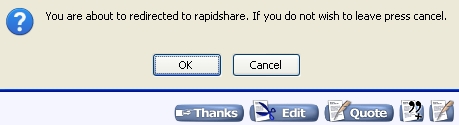
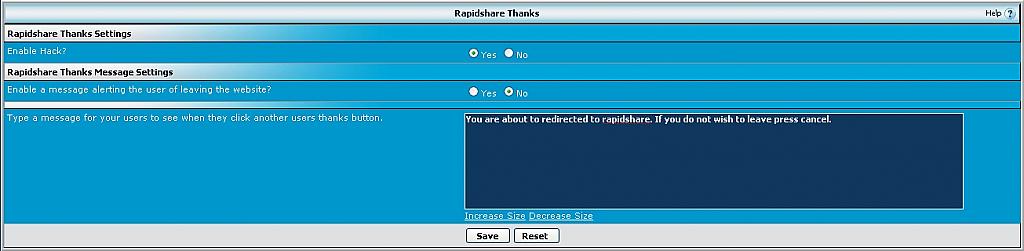
2.5 - Fixed an issue with the server sufficient code caused the button to repeat. Added a message feature so that when the user clicks the Thanks button they are informed that they are being redirected to Rapidshare. Since there is more to see, I have added screenshots.
2.6 - Fixed the repeating issue for sure this time. I accidentally left out the fix in the last release.
If you have any feature requests let me know. The only reason I have this in beta stages is because I haven't got all the initial features I wanted to include in it yet. If people like it I will continue to develop this modification and work on the features I wanted to include to get this out of the beta stages.
Template Edits: 1
File Edits: 1
Features
- Thanks button links to a rapidshare file.
- Members can ONLY add a rapidshare file and NOT a rapidshare folder. (So they don't mislead other members to download their stuff)
- For security reasons members are blocked from using a different website. (So they can't redirect members where ever)
Upgrading
2.2 and above can simply import the product and select "Allow Overwrite".
2.1 and below you must uninstall the old product!
Step 1
Admin -> User Profile Fields -> Add New User Profile Field
Single-Line Text Box
Title
Rapidshare Thanks File ID
Description:
Enter your Rapidshare file ID that you wish for members to download in order to thank you.
EX: http://rapidshare.com/files/<b><u>000000000/filename.zip</u></b>
Private Field: Yes
Field Searchable on Members List: No
Show on Members List: No
Step 2
Open product-rapidsharethanks.xml and find both instances of $post[fieldX], replace the X with the profile field ID you just created, and save.
Step 3
Upload the contents of the upload folder to your forum root.
Step 4
In postbit find an area you wish to place the thanks button and add this code:
<!-- Rapidshare Thanks -->
To have it show before the edit button add the code before:
PHP Code:
            <if condition="$post['editlink']">

                <img style="display: none" id="progress_$postid" src="$stylevar[imgdir_misc]/progress.gif" alt="$vbphrase[loading_editor_please_wait]" />

                <a href="$post[editlink]" name="vB::QuickEdit::$post[postid]"><img src="$stylevar[imgdir_button]/edit.gif" alt="$vbphrase[edit_delete_message]" border="0" /></a>

            </if>
Step 5
Install the plugin.
Changelog:
1.0 - Release
2.0 - Fixed a small issue that caused the thanks button to show for those that don't have the thanks system setup in their usercp.
2.1 - I forgot a small bit of code to make it so the thanks button only shows for those that don't have the thanks system setup in their usercp. It works now, my bad it was 8:00 A.M. when I worked on the first fix. I also updated the profile field example.
2.2 - Rewrote parts of the modification to be more server sufficient. Also all future updates will not need to be uninstalled. A simple Allow Overwrite will work. However this update will require you to uninstall and install the updated product.
2.5 - Fixed an issue with the server sufficient code caused the button to repeat. Added a message feature so that when the user clicks the Thanks button they are informed that they are being redirected to Rapidshare. Since there is more to see, I have added screenshots.
2.6 - Fixed the repeating issue for sure this time. I accidentally left out the fix in the last release.
If you have any feature requests let me know. The only reason I have this in beta stages is because I haven't got all the initial features I wanted to include in it yet. If people like it I will continue to develop this modification and work on the features I wanted to include to get this out of the beta stages.
Download
 Rapidshare Thanks.zip (3.6 KB, 54 downloads)
Screenshots