Clan Tags for Usernames in Posts
Mod Version: 1.3, by harmor19
| vB Version: 3.8.0 | Rating:  (3 votes - 4.67 average) (3 votes - 4.67 average) |
Installs: 59 |
| Released: 12 May 2009 | Last Update: 16 May 2009 | Downloads: 327 |
 Not Supported Not Supported
 Uses Plugins Uses Plugins
|
||
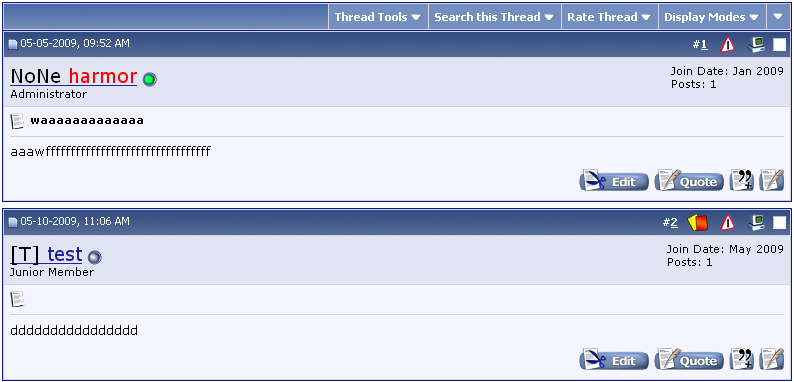
With this modification you can create a Custom Profile Field that displays to the left of the username in posts as well as assign a color to the tags without editing a template.
Install Instructions
1. Go to ACP
2. Expand "Plugins & Products"
3. Click "Manage Products"
4. Click "[Add/Import Product]"
5. Browse to "product-ah_clan_tags.xml" and import it.
Setup Instructions
Create a Custom Profile Field that you wish to be displayed beside usernames.
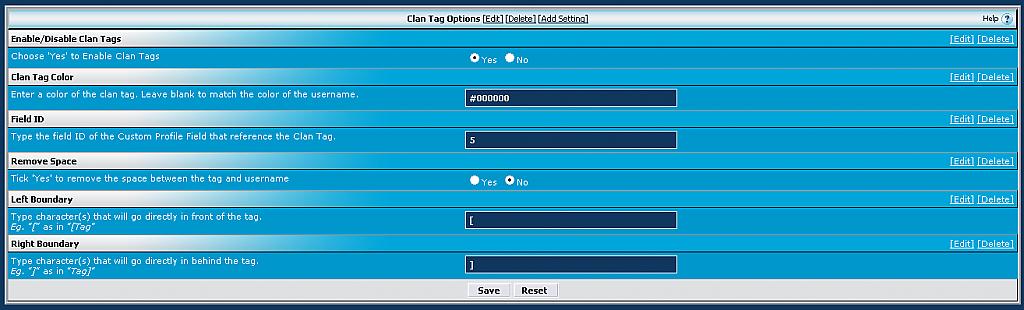
Remember the number of the field ID and go into "Clan Tag Options" in "vBulletin Options".
Type the number into the field labeled "Field ID".
The Left and Right Boundary fields can be used to identify the tag.
Instead of "Revharmor19" you can change it to "[Rev]harmor19" or any other character(s) you wish.
Updates
1.1: Fixed the problem of another Custom Profile Field showing when you assign a color to the tags.
1.2: An option to either add or remove the space between the tag and username.
You can add boundary boxes to make the tags easily recognizable.
1.3: Fixed issue with displaying of boundary boxes even if the user didn't enter any text into the field on their profile.
Install Instructions
1. Go to ACP
2. Expand "Plugins & Products"
3. Click "Manage Products"
4. Click "[Add/Import Product]"
5. Browse to "product-ah_clan_tags.xml" and import it.
Setup Instructions
Create a Custom Profile Field that you wish to be displayed beside usernames.
Remember the number of the field ID and go into "Clan Tag Options" in "vBulletin Options".
Type the number into the field labeled "Field ID".
The Left and Right Boundary fields can be used to identify the tag.
Instead of "Revharmor19" you can change it to "[Rev]harmor19" or any other character(s) you wish.
Updates
1.1: Fixed the problem of another Custom Profile Field showing when you assign a color to the tags.
1.2: An option to either add or remove the space between the tag and username.
You can add boundary boxes to make the tags easily recognizable.
1.3: Fixed issue with displaying of boundary boxes even if the user didn't enter any text into the field on their profile.
Download
 product-ah_clan_tags.xml (4.9 KB, 306 downloads)
Screenshots