Toksta Chat Integration
Mod Version: 1.00, by veenuisthebest
| vB Version: 3.8.x | Rating:  (2 votes - 5.00 average) (2 votes - 5.00 average) |
Installs: 37 |
| Released: 22 Apr 2009 | Last Update: 22 Apr 2009 | Downloads: 307 |
 Not Supported Not Supported
 Uses Plugins
Template Edits
External Content Uses Plugins
Template Edits
External Content
|
||
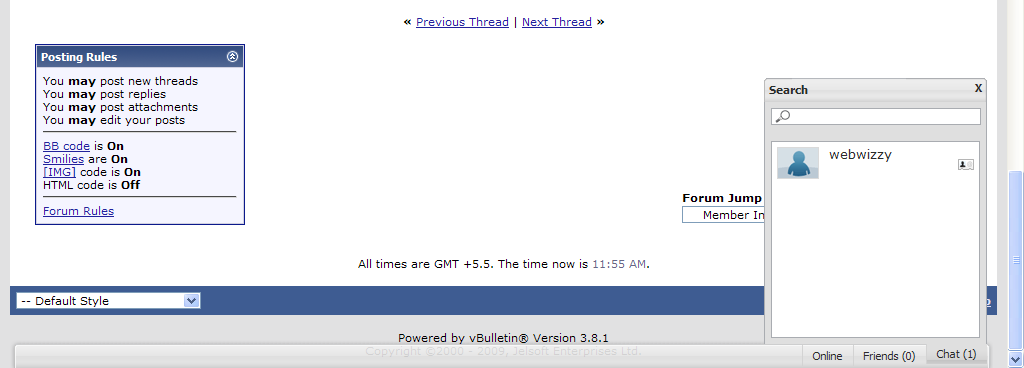
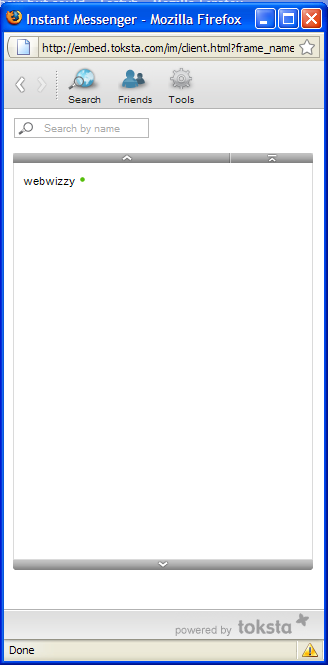
toksta provides highly scalable instant messenger and chat solutions for online communities such as social networks, dating sites and forums. All applications are hosted by toksta and offer a rich design customization.
Integrate the toksta IM in less than 5 minutes and increase user engagement and time on site. Excite your community.
Steps to Install:-
1. Register an account with http://www.toksta.com - Add Application (Add Site) - Select Free Plan - Note the App ID and App Password
2. Upload toksta_controller.html to the root of your domain. The file must be available through http://www.your-domain.com/toksta_controller.html afterwards.
3. Import the Product -> go to vBulletin Option Settings -> Instant Toksta Chat -> enter your App ID and App Password and Enable the product.
4. Edit your footer template and add this at the very end:-
Steps to Uninstall:-
1. Uninstall the Product.
2. Remove the Toksta Chat code from the footer template that you added in Step 4.
Pros:- Looks cool, can bring some fun | No bandwidth, server usage as everything is hosted on their server.
Cons:- Not for everybody as it may bring down forum activity | Currently only Mozilla Firefox is supported but they are constantly upgrading their code so all browsers should be supported very soon.
FAQ:-
a) Should work for all 3.X version of vBulletin.
b) To disable chat for certain usergroups, simply edit the conditional part in the Step 4 code. Also note that I have already disabled chat for Guests and Banned usergroup (1 and 8).
c) If the chatbar doesn't show up - Make sure you have enabled the product (its disabled by default), and confirm your App ID and App Password.
d) About load - just 1 small global plugin, 0 queries.
e) Don't ask for a Demo please as I don't have one. It would take a minute to install this and test yourself.
f) Also check out the paid plans at their site if you are interested in a lot of customizations and higher limits. Free plan is very basic but sufficient for most of us.
Toksta now support integration with vbulletin officially. SO BETTER USE THEIR VERSION INSTEAD OF THIS.
Hope you like it. Please .
Referance: http://tech6.com/f51/toksta-chat-integration-vbulletin-t776/
Integrate the toksta IM in less than 5 minutes and increase user engagement and time on site. Excite your community.
Steps to Install:-
1. Register an account with http://www.toksta.com - Add Application (Add Site) - Select Free Plan - Note the App ID and App Password
2. Upload toksta_controller.html to the root of your domain. The file must be available through http://www.your-domain.com/toksta_controller.html afterwards.
3. Import the Product -> go to vBulletin Option Settings -> Instant Toksta Chat -> enter your App ID and App Password and Enable the product.
4. Edit your footer template and add this at the very end:-
Code:
<!-- Toksta Chat -->
<if condition="!is_member_of($vbulletin->userinfo, 1, 8)">
<script type="text/javascript">
var TOKSTA_CONFIG = {
    app_id : "$tk_app_id",
    user_id: "$tk_user_id",
    user_hash: "$tk_hash",
    user_data: "$tk_user_data",
    generated : "1240098757",
    im : {
        advanced_search : ["gender","age","city","country","single"]
    },
    chatbar : {
        showUserData : ["gender","age"]
    }
};
</script>
<script src="http://embed.toksta.com/embed/toksta.js" type="text/javascript"></script></if>
<!-- End Toksta Chat -->
Steps to Uninstall:-
1. Uninstall the Product.
2. Remove the Toksta Chat code from the footer template that you added in Step 4.
Pros:- Looks cool, can bring some fun | No bandwidth, server usage as everything is hosted on their server.
Cons:- Not for everybody as it may bring down forum activity | Currently only Mozilla Firefox is supported but they are constantly upgrading their code so all browsers should be supported very soon.
FAQ:-
a) Should work for all 3.X version of vBulletin.
b) To disable chat for certain usergroups, simply edit the conditional part in the Step 4 code. Also note that I have already disabled chat for Guests and Banned usergroup (1 and 8).
c) If the chatbar doesn't show up - Make sure you have enabled the product (its disabled by default), and confirm your App ID and App Password.
d) About load - just 1 small global plugin, 0 queries.
e) Don't ask for a Demo please as I don't have one. It would take a minute to install this and test yourself.
f) Also check out the paid plans at their site if you are interested in a lot of customizations and higher limits. Free plan is very basic but sufficient for most of us.
Toksta now support integration with vbulletin officially. SO BETTER USE THEIR VERSION INSTEAD OF THIS.
Hope you like it. Please .
Referance: http://tech6.com/f51/toksta-chat-integration-vbulletin-t776/
Download
 product-toksta.zip (69.5 KB, 342 downloads)
Screenshots