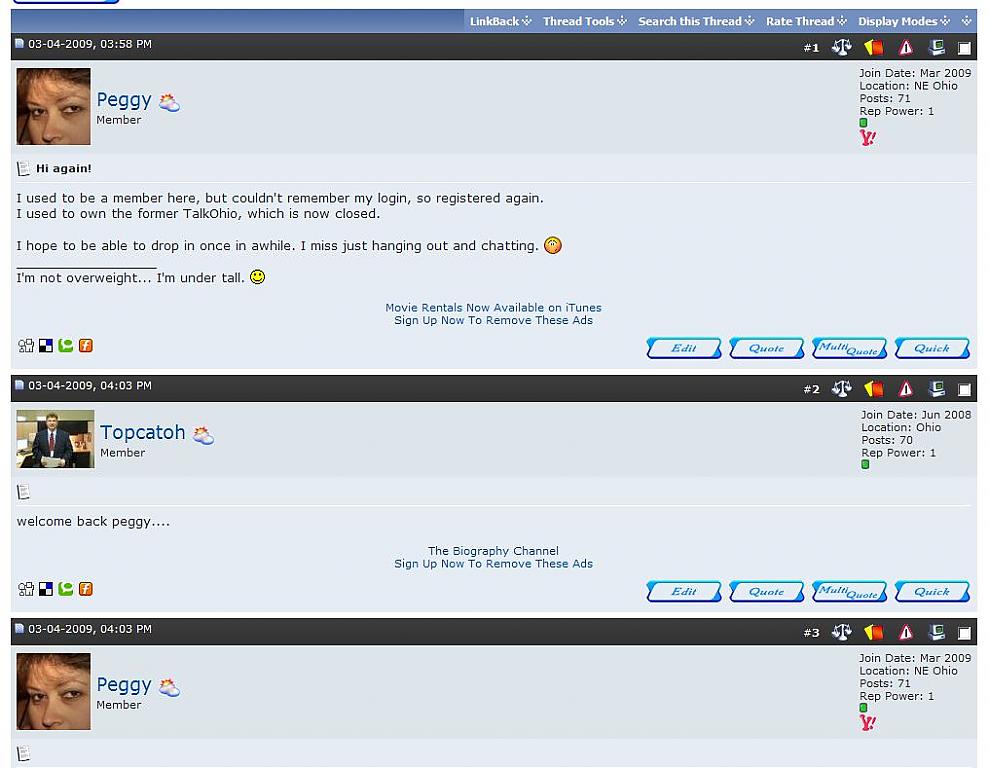
New Ad Location - Below Postbit Signature
Mod Version: 1.00, by TalkVirginia
| vB Version: 3.8.1 | Rating:  (1 vote - 5.00 average) (1 vote - 5.00 average) |
Installs: 12 |
| Released: 28 Mar 2009 | Last Update: Never | Downloads: 2 |
 Not Supported Not Supported
 Template Edits
Code Changes
Re-usable Code Template Edits
Code Changes
Re-usable Code
|
||
What it does?
Have you wanted to add a new Ad Location below the signature in each Postbit where you can place text ads or banner ads?
File Edits: 2
Template Edits: 2
New Templates: 1
*** This has only been tested with vBulletin 3.8.1. ***
Instructions
1. Make a backup of your Class_Postbit.php and your Showthread.php.
2. Open the Class_Postbit.php in your forum includes folder and look for:
(Note: The ending "}" should be on or around line 300.)
2. Add the following code below it:
3. Save the file.
4. Log into your AdminCP, and go to:
Styles & Templates => Styles Manager => Master Style => Add New Template
Product: vbulletin
Title: ad_showthread_below_sig
Template:
Note: I had to add the new template to the Master Style in order to get it to show up under existing "Ad Locations Template" group.
5. Save your new template.
6. Now, make the following edit to your Postbit and Postbit Legacy templates:
Find:
7. Add the following below:
8. Save template and do the same in Postbit_legacy.
9. Open showthread.php in the forum root folder and look for:
9. Insert "'ad_showthread_below_sig', in between
"'ad_showthread_firstpost_start'," and "'forumdisplay_loggedinuser',"
which should look like this when done:
10. Save the file.
11. Upload your edited showthread.php to your forum's root folder, and
class_postbit.php file to your forum's includes folder overwriting the existing file.
Optional: If you use an ad rotation system such as OpenX, you may need to create a new plugin using the "postbit_display_start" hook for the ad to show up.
If you have questions, let me know and I'll try to help as much as I can.
Have you wanted to add a new Ad Location below the signature in each Postbit where you can place text ads or banner ads?
File Edits: 2
Template Edits: 2
New Templates: 1
*** This has only been tested with vBulletin 3.8.1. ***
Instructions
1. Make a backup of your Class_Postbit.php and your Showthread.php.
2. Open the Class_Postbit.php in your forum includes folder and look for:
PHP Code:
  if ($post['isfirstshown'])

  {

   eval('$ad_location[\'ad_showthread_firstpost_start\'] = "' . fetch_template('ad_showthread_firstpost_start') . '";');

   eval('$ad_location[\'ad_showthread_firstpost_sig\'] = "' . fetch_template('ad_showthread_firstpost_sig') . '";');

  }
2. Add the following code below it:
PHP Code:
eval('$ad_location[\'ad_showthread_below_sig\'] = "' . fetch_template('ad_showthread_below_sig') . '";');
4. Log into your AdminCP, and go to:
Styles & Templates => Styles Manager => Master Style => Add New Template
Product: vbulletin
Title: ad_showthread_below_sig
Template:
HTML Code:
<br />
<div align="center" class="smallfont">
This is a test ad below everyone's signature<br />
<a href="http://www.mydomain.com/register.php" target="_self">Sign Up Now To Remove These Ads</a>
</div>
5. Save your new template.
6. Now, make the following edit to your Postbit and Postbit Legacy templates:
Find:
Code:
$template_hook[postbit_signature_end]
Code:
$ad_location[ad_showthread_below_sig]
9. Open showthread.php in the forum root folder and look for:
PHP Code:
// pre-cache templates used by all actions

$globaltemplates = array(

    'ad_showthread_beforeqr',

    'ad_showthread_firstpost',

    'ad_showthread_firstpost_start',

    'forumdisplay_loggedinuser',

    'forumrules',

    'im_aim',

    'im_icq',
"'ad_showthread_firstpost_start'," and "'forumdisplay_loggedinuser',"
which should look like this when done:
PHP Code:
// pre-cache templates used by all actions

$globaltemplates = array(

    'ad_showthread_beforeqr',

    'ad_showthread_firstpost',

    'ad_showthread_firstpost_start',

                'ad_showthread_firstpost_sig',

                'ad_showthread_below_sig',

    'forumdisplay_loggedinuser',

    'forumrules',

    'im_aim',

    'im_icq',
11. Upload your edited showthread.php to your forum's root folder, and
class_postbit.php file to your forum's includes folder overwriting the existing file.
Optional: If you use an ad rotation system such as OpenX, you may need to create a new plugin using the "postbit_display_start" hook for the ad to show up.
If you have questions, let me know and I'll try to help as much as I can.
Make sure you Click Install if you use this!!!
Download
No files for download.
Screenshots