vblog2wp : show last X vb blogs in wordpress
Mod Version: 1.00, by cad2go
| vB Version: 3.8.1 | Rating:  (1 vote - 5.00 average) (1 vote - 5.00 average) |
Installs: 6 |
| Released: 17 Mar 2009 | Last Update: Never | Downloads: 50 |
 Not Supported
Is in Beta Stage Not Supported
Is in Beta Stage
|
||
Last 'x' vblogs as wordpress page (cached)
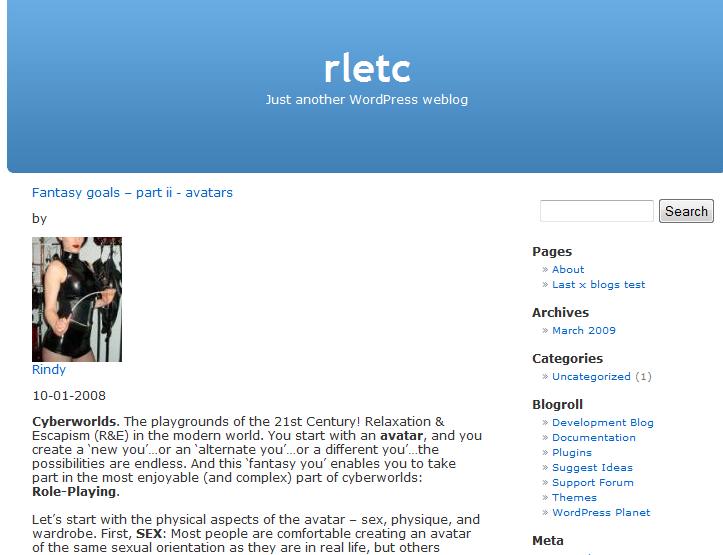
Add a page to your wordpress blog that shows the last 'x' vblogs. The page will have your standard header, footer, sidebar as well as the content from as many vblogs as you like.
Ideal if you have a forum at http://www.yourdomain.com/forum and want to show show blogs at http://www.yourdomain.com. In fact for the instructions we'll presume just that.
It supports showing avatar only IF they are held within the filesystem. I recommend you change this if you want to use this mod. In fact, I recommend using the filesystem for all images regardless of whether you use this mod or not.
Features:
*Last x Blogs
*Smilies/Images and all bbcode
*Avatars
*Tags
*Categories
*AME 2.5 - Media Embedding for posts, sigs, vm's, groups and blogs fully supported
*Three queries! (Per hour if you want!)
*No file or db changes
*Digg Proof
*Free!
Instructions:
To Install:
1. First create a writeable directory for the cache file with appropriate permissions
2. Open vblog2wp.php [attached]
Edit the following:
Unfortunately this varies by theme. Try replacing with
or just
if you're not sure or use firebug to examine your blog css and replace with that.
These are the paths on your server NOT the web addresses.
Next edit:
These are relative paths so if your forums are at http://www.mydomain.com/forums then $wwwforumpath would be '/forums'
3. Upload vblog2wp.php to your wordpress default theme folder ( something like /var/www/vhosts/yourdomain.com/httpdocs/wp-content/themes/default)
4. In your wordpress cp, go to page>add page, pick last x blogs from the template menu, give the page a title and publish!
5. Done!
Extra Notes:
*If you want to make it your static front page , click settings in dashboard then reading. For "Front page displays" pick "A static page" then select your vb page from the list. (If you expect a lot of hits install extra caching for the rest of wp - e.g. WP Super Cache
*If you don't want a sidebar just remove "<?php get_sidebar(); ?>" from vblog2wp.php
Pic shows blog page in default wp theme:
Demo:
http://www.rletc.com
Add a page to your wordpress blog that shows the last 'x' vblogs. The page will have your standard header, footer, sidebar as well as the content from as many vblogs as you like.
Ideal if you have a forum at http://www.yourdomain.com/forum and want to show show blogs at http://www.yourdomain.com. In fact for the instructions we'll presume just that.
It supports showing avatar only IF they are held within the filesystem. I recommend you change this if you want to use this mod. In fact, I recommend using the filesystem for all images regardless of whether you use this mod or not.
Features:
*Last x Blogs
*Smilies/Images and all bbcode
*Avatars
*Tags
*Categories
*AME 2.5 - Media Embedding for posts, sigs, vm's, groups and blogs fully supported
*Three queries! (Per hour if you want!)
*No file or db changes
*Digg Proof
*Free!
Instructions:
To Install:
1. First create a writeable directory for the cache file with appropriate permissions
2. Open vblog2wp.php [attached]
Edit the following:
Code:
<div id="content" class="narrowcolumn">
Code:
<div id="container">
Code:
<div>
Code:
$numblogs=5; //NUMBER OF BLOGS SHOWN
$cachetime=60; //HOW LONG (IN SECONDS) BETWEEN CALLS TO THE DATABASE TO CHECK FOR UPDATED CONTENT
$forumpath = '/var/www/vhosts/yourdomain.com/httpdocs/forum'; //no trailing slashes!
$cachepath = '/var/www/vhosts/yourdomain.com/cache';// no trailing slashes and writable!
Next edit:
Code:
$wwwavatarpath = '/forum/customavatars'; //no trailing slashes
$wwwforumpath = '/forum'; //no trailing slashes
3. Upload vblog2wp.php to your wordpress default theme folder ( something like /var/www/vhosts/yourdomain.com/httpdocs/wp-content/themes/default)
4. In your wordpress cp, go to page>add page, pick last x blogs from the template menu, give the page a title and publish!
5. Done!
Extra Notes:
*If you want to make it your static front page , click settings in dashboard then reading. For "Front page displays" pick "A static page" then select your vb page from the list. (If you expect a lot of hits install extra caching for the rest of wp - e.g. WP Super Cache
*If you don't want a sidebar just remove "<?php get_sidebar(); ?>" from vblog2wp.php
Pic shows blog page in default wp theme:
Demo:
http://www.rletc.com
Download
 vblog2wp.php (4.6 KB, 50 downloads)
Screenshots