Vbdock
Mod Version: 1.00, by figu120
| vB Version: 3.8.x | Rating:  (8 votes - 5.00 average) (8 votes - 5.00 average) |
Installs: 65 |
| Released: 30 Jan 2009 | Last Update: Never | Downloads: 476 |
 Not Supported Not Supported
 Template Edits
Additional Files
Re-usable Code Template Edits
Additional Files
Re-usable Code
|
||
Version: 1.0
vB Version: 3.6.x 3.7.x 3.8.x
Released: 03-August-2008
Live demo:
http://www.parcherock.com
General Description:
Create a menu-style dock for Mac OS X based on CSS and Javascript. (View image)
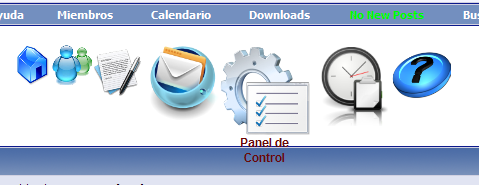
Installation:
1. Upload via FTP the contents of the folder to upload the directory where you installed vBulletin
2. Go to AdminCP -> Styles & Templates -> Style Manager -> Expand the menu and choose Edit Templates. Edit the navbar template that is inside the Templates Header.
Paste at the end of the template
Customize:
1. How to add or remove buttons?
- To add buttons, paste at the end of the template
Before they add:
- To remove buttons, simply delete the line referring to the button you want to delete.
2. How to customize the background of the buttons?
- Edit the file. Css is included in the dock folder and look for the following:
Amendment to the line by placing the url of background image to the desired setting or the chosen color in hexadecimal format. For ex. # ff0000; if you want a red background color.
Do the same with the following section:
vB Version: 3.6.x 3.7.x 3.8.x
Released: 03-August-2008
Live demo:
http://www.parcherock.com
General Description:
Create a menu-style dock for Mac OS X based on CSS and Javascript. (View image)
Installation:
1. Upload via FTP the contents of the folder to upload the directory where you installed vBulletin
2. Go to AdminCP -> Styles & Templates -> Style Manager -> Expand the menu and choose Edit Templates. Edit the navbar template that is inside the Templates Header.
Paste at the end of the template
Code:
<!-- CSS Mac Dock -->
<script type="text/javascript" src="clientscript/jquery.js"></script>
<script type="text/javascript" src="clientscript/interface.js"></script>
<!--[if lt IE 7]>
 <style type="text/css">
 div, img { behavior: url(images/dock/iepngfix.htc) }
 </style>
<![endif]-->
<link href="images/dock/style.css" rel="stylesheet" type="text/css" />
</head>
<body>
<div class="dock" id="dock">
  <div class="dock-container">
  <a class="dock-item" href="$vboptions[bburl]$session[sessionurl_q]"><img src="images/dock/home.png" alt="home" /><span>Página Principal</span></a>
  <a class="dock-item" href="memberlist.php$session[sessionurl_q]"><img src="images/dock/users.png" alt="usuarios" /><span>Miembros</span></a>
  <a class="dock-item" href="search.php?$session[sessionurl]do=getnew"><img src="images/dock/newpost.png" alt="nuevos mensajes" /><span>Nuevos Mensajes</span></a>
  <a class="dock-item" href="private.php$session[sessionurl_q]"><img src="images/dock/mp.png" alt="mensajes privados" /><span>Mensajes Privados</span></a>
  <a class="dock-item" href="usercp.php$session[sessionurl_q]"><img src="images/dock/usercp.png" alt="panel de control" /><span>Panel de Control</span></a>
  <a class="dock-item" href="calendar.php$session[sessionurl_q]"><img src="images/dock/calendar.png" alt="calendar" /><span>Calendar</span></a>
  <a class="dock-item" href="faq.php$session[sessionurl_q]"><img src="images/dock/faq.png" alt="FAQ" /><span>FAQ</span></a>
</div>
</div>
<script type="text/javascript">
 $(document).ready(
  function()
  {
   $('#dock').Fisheye(
    {
     maxWidth: 50,
     items: 'a',
     itemsText: 'span',
     container: '.dock-container',
     itemWidth: 40,
     proximity: 90,
     halign : 'center'
    }
   )
  }
 );
</script>
<br /><br /><br /><br />
<!-- / CSS Mac Dock -->
1. How to add or remove buttons?
- To add buttons, paste at the end of the template
Before they add:
Code:
<a href= "ENLACE_DEL_BOTON" class= "fisheyeItem"> <img src= "ENLACE_DE_LA_IMAGEN" width= "30" /> <span> TITULO_DEL_BOTON </ span> </ a>
2. How to customize the background of the buttons?
- Edit the file. Css is included in the dock folder and look for the following:
Code:
 body
   (
     background: url (images / main-bg.gif);
     height: 100%;
     font-family: Arial, Helvetica, sans-serif;
     font-size: 12px;
   )
Do the same with the following section:
Code:
  .-dock container
          (
     position: absolute;
     height: 50px;
     background: url (images / dock-bg.gif);
     padding-left: 20px;
   )
Download
 vBdock.zip (263.7 KB, 464 downloads)
Screenshots