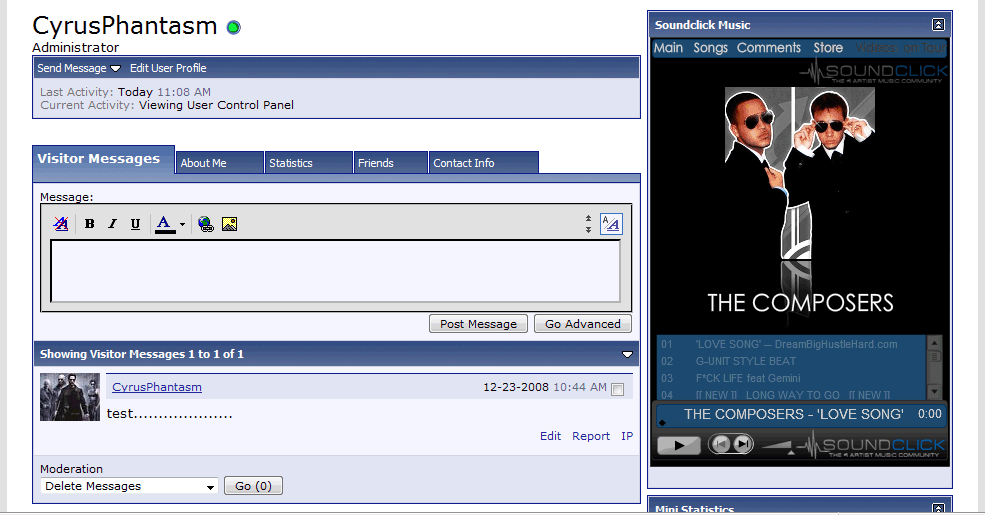
Soundclick Music Player Add-on
Mod Version: 1.00, by indie2industry
This modification is in the archives.
| vB Version: 3.7.x | Rating:  (1 vote - 5.00 average) (1 vote - 5.00 average) |
Installs: 9 |
| Released: 26 Dec 2008 | Last Update: Never | Downloads: 53 |
 Not Supported Not Supported
 Uses Plugins
Template Edits
Re-usable Code
Translations
External Content Uses Plugins
Template Edits
Re-usable Code
Translations
External Content
|
||
With this mod, your users can place their music player from https://www.soundclick.com within their profiles.
Install Instructions:
>>>Step 1. Go To AdminCP, Create 1 profile field:
Single-Line Text Box
Title: Soundclick Music
Description: Insert your soundclick Band ID number here. You can find it by logging into
your soundclick profile and checking the ending of the URL.
Private field: Yes.
Field Searchable on Members List: No
Show on Members List: No
>>>>Step 2. import product
PLEASE NOTE!!!! BEFORE IMPORTING PRODUCT, edit the XML FILE
Find:
Change 1,2,5,6,7 to the usergroups you want to be able to view the music player.
>>>>Step 3. go to Style Manager-> edit templates-> Member Info Templates-> MEMBERINFO, find:
directly under that put:
>>>>Step 4. go to Style Manager-> edit templates-> Member Info Templates-> memberinfo_block_scmusicplayer, find:
([fieldx] shows up 2 times)
>>>>change "x" to appropriate field number<<<<
>>>>Step 5. Go to Style Manager-> edit templates-> Member Info Templates-> memberinfo_css, find:
Directly below put:
Find:
Directly Below Put:
If you have any custom templates that effect your css, make sure adjust them accordingly.
>>>>>change "[fieldx]" to appropriate field number<<<<

Install Instructions:
>>>Step 1. Go To AdminCP, Create 1 profile field:
Single-Line Text Box
Title: Soundclick Music
Description: Insert your soundclick Band ID number here. You can find it by logging into
your soundclick profile and checking the ending of the URL.
Private field: Yes.
Field Searchable on Members List: No
Show on Members List: No
>>>>Step 2. import product
PLEASE NOTE!!!! BEFORE IMPORTING PRODUCT, edit the XML FILE
Find:
Code:
<phpcode><![CDATA[if (is_member_of($vbulletin->userinfo,1 ,2 , 5, 6, 7))
>>>>Step 3. go to Style Manager-> edit templates-> Member Info Templates-> MEMBERINFO, find:
Code:
<div id="sidebar_container">
	<!-- sidebar -->
directly under that put:
Code:
$blocks[Soundclick_music_player]
>>>>Step 4. go to Style Manager-> edit templates-> Member Info Templates-> memberinfo_block_scmusicplayer, find:
Code:
[fieldx]
>>>>change "x" to appropriate field number<<<<
>>>>Step 5. Go to Style Manager-> edit templates-> Member Info Templates-> memberinfo_css, find:
Code:
#content_container
Code:
<if condition="$userinfo[fieldx]">
 {
	width:865px;
	float:$stylevar[left];
	margin-$stylevar[right]:-256px;
}
</if>
Find:
Code:
#sidebar_container
Directly Below Put:
Code:
<if condition="$userinfo[fieldx]">
{
	width:306px;
	float:$stylevar[right];
}
</if>
If you have any custom templates that effect your css, make sure adjust them accordingly.
>>>>>change "[fieldx]" to appropriate field number<<<<
Click Installed
Download
This modification is archived, downloads are still allowed.
 Soundclick in vb 3.7.x.zip (2.3 KB, 60 downloads)
Screenshots