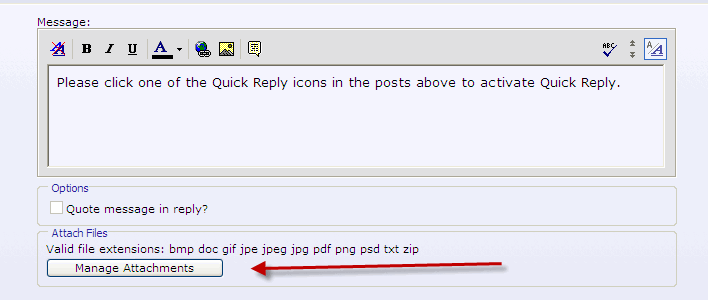
Attach Files in Quick Reply
Mod Version: 1.00, by abus3d
This modification is in the archives.
| vB Version: 3.7.4 | Rating:  (3 votes - 5.00 average) (3 votes - 5.00 average) |
Installs: 17 |
| Released: 17 Nov 2008 | Last Update: Never | Downloads: 63 |
 Not Supported Not Supported
 Template Edits
Code Changes
Translations Template Edits
Code Changes
Translations
|
||
Dear All ....
since every body know we cant attach any file from the qucik reply, we have to go use newreply or newthread to use this feature ....
- since 3 days i am working in this option, with tries and errors and finally i succed to add the attach files in the quick reply to make it easy for the users.
** 3.7.4 **
+++++++++++++++++++++++++++++++++++++++++++++++++
The steps :
1- showthread.php :
please open the file ...
=== attached all the modifications for your helps ===
a- search for
add after this code the following :
PHP Code:
b- search for
PHP Code:
add after this the followings :
c- search for
befor this you have to add the following
d- please save your file (showthread.php)
++++++++++++++++++++++++++++++++++++++++++++++++++ ++++++
2- now we have to make some modifications in showthread template
a- please open your showthread tempale
search for :
after this please add the followings :
b- in the same template you search :
you add after this the following :
finally save your template
since every body know we cant attach any file from the qucik reply, we have to go use newreply or newthread to use this feature ....
- since 3 days i am working in this option, with tries and errors and finally i succed to add the attach files in the quick reply to make it easy for the users.
** 3.7.4 **
+++++++++++++++++++++++++++++++++++++++++++++++++
The steps :
1- showthread.php :
please open the file ...
=== attached all the modifications for your helps ===
a- search for
PHP Code:
'bbcodecache',
PHP Code:
PHP Code:
'attachmentcache',
b- search for
PHP Code:
PHP Code:
'showthread_quickreply',
PHP Code:
'newpost_attachment',

 'newpost_attachmentbit',
PHP Code:
// *********************************************************************************

// build quick reply if appropriate
befor this you have to add the following
PHP Code:
// get attachment options - by abus3d (www.marsasoft.net)

 require_once(DIR . '/includes/functions_file.php');

 $inimaxattach = fetch_max_upload_size();

 $attachtypes =& $vbulletin->attachmentcache;

 $maxattachsize = vb_number_format($inimaxattach, 1, true);

 $attachcount = 0;

 $attach_editor = array();

 if ($forumperms & $vbulletin->bf_ugp_forumpermissions['canpostattachment'] AND

$vbulletin->userinfo['userid'])

 {

  if (!$posthash OR !$poststarttime)

  {

   $poststarttime = TIMENOW;

   $posthash = md5($poststarttime . $vbulletin->userinfo['userid'] .

$vbulletin->userinfo['salt']);

  }

  else

  {

   if (empty($postattach))

   {

    $currentattaches = $db->query_read("

     SELECT dateline, filename, filesize, attachmentid

     FROM " . TABLE_PREFIX . "attachment

     WHERE posthash = '" .

$db->escape_string($newpost['posthash']) . "'

      AND userid = " .

$vbulletin->userinfo['userid']

    );

    while ($attach = $db->fetch_array($currentattaches))

    {

     $postattach["$attach[attachmentid]"] = $attach;

    }

   }

   if (!empty($postattach))

   {

    foreach($postattach AS $attachmentid => $attach)

    {

     $attach['extension'] =

strtolower(file_extension($attach['filename']));

     $attach['filename'] =

htmlspecialchars_uni($attach['filename']);

     $attach['filesize'] =

vb_number_format($attach['filesize'], 1, true);

     $show['attachmentlist'] = true;

     eval('$attachments .= "' .

fetch_template('newpost_attachmentbit') . '";');

     $attachment_js .=

construct_attachment_add_js($attachmentid, $attach['filename'], $attach['filesize'],

$attach['extension']);

     $attach_editor["$attachmentid"] =

$attach['filename'];

    }

   }

  }

  $attachurl = "t=$threadinfo[threadid]";

  eval('$attachmentoption = "' . fetch_template('newpost_attachment') .

'";');

  $attach_editor['hash'] = $postid;

  $attach_editor['url'] =

"newattachment.php?$session[sessionurl]t=$threadinfo[threadid]&poststarttime=$poststartt

ime&posthash=$posthash";

 }

 else

 {

  $attachmentoption = '';

 }
++++++++++++++++++++++++++++++++++++++++++++++++++ ++++++
2- now we have to make some modifications in showthread template
a- please open your showthread tempale
search for :
PHP Code:
<input type="hidden" name="p" value="$qrpostid" id="qr_postid" />
PHP Code:
<input type="hidden" name="posthash" value="$posthash" />

   <input type="hidden" name="poststarttime" value="$poststarttime" />
b- in the same template you search :
PHP Code:
<if condition="$bbuserinfo['signature']">

        <div style="float:$stylevar[right]"><label for="cb_signature"><input type="checkbox" name="signature" value="1" id="cb_signature" tabindex="5" checked="checked" />$vbphrase[show_your_signature]</label></div>

       </if>

       <label for="qr_quickreply"><input type="checkbox" name="quickreply" value="1" id="qr_quickreply" accesskey="w" tabindex="4" />$vbphrase[quote_message_in_reply]</label>

      </div>

     </fieldset>
you add after this the following :
PHP Code:
$attachmentoption
finally save your template
Download
This modification is archived, downloads are still allowed.
 Attach Files in Quick Reply.zip (31.7 KB, 68 downloads)
Screenshots