Automiatc Specific User Text Colouring
Mod Version: 1.00, by Renny
This modification is in the archives.
| vB Version: 3.7.3 | Rating:  (1 vote - 5.00 average) (1 vote - 5.00 average) |
Installs: 4 |
| Released: 13 Oct 2008 | Last Update: Never | Downloads: 0 |
 Not Supported Not Supported
 Code Changes Code Changes
|
||
Hello,
I asked how to do this a while back and was told how and thought id post it incase everyone else would like to do this.
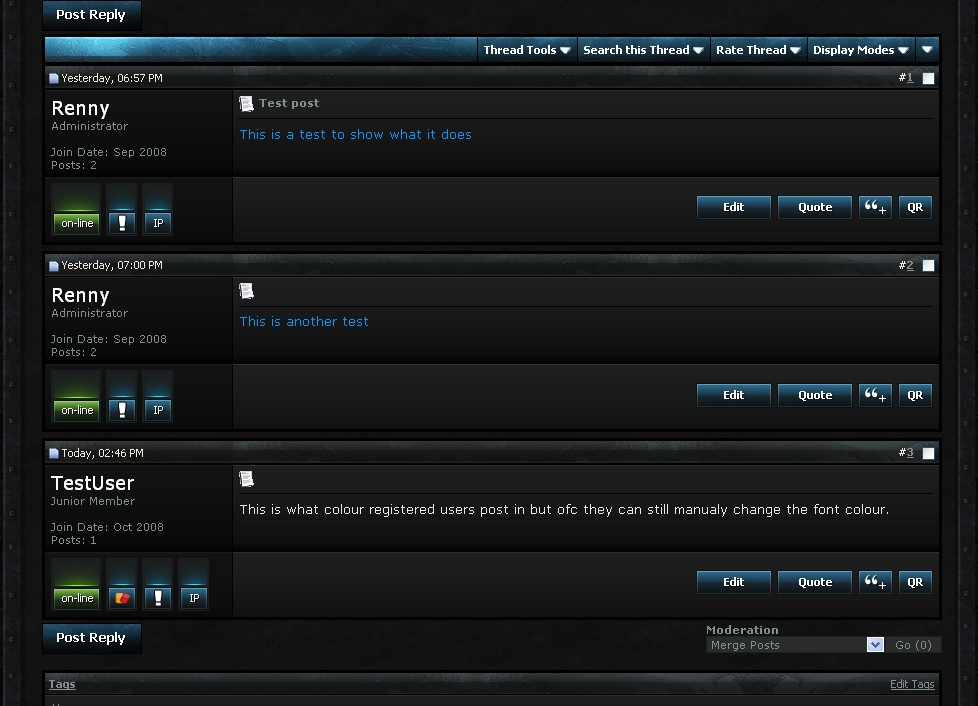
The mod is simple, it allows you to set a specific colour for a usergroup you set so when a member of that usergroup post it is automaticly posted as the colour you've set. however the colour can be changed if the user seletes a different colour from the text colours
>>> I take no credit for this coding, full credit to Karri <<<
Please note you will have to edit the code to any layout(s) you have and want it to show on.
First login to your admincp --> Style Manager --> Edit Templates
In your postbit find
replace with
where the # are you put the user groups id for example if i wanted to set my admin, id put
after you are happy with this click save.
If your using legacy, make sure you edit postbit_legacy instead of or aswell as postbit.
once this is done go to your Main CSS and add in "Additional CSS Definitions" the following
# replace with the group id and click Save.
Remember that if you have more then one forum skin you will have to edit the code thoughout them inorder for it to show.
i hope this helps and can understand my guide. I will look in to trying to make it in to a mod. if you have any further questions please ask.
Renny
Show your support by clicking
I asked how to do this a while back and was told how and thought id post it incase everyone else would like to do this.
The mod is simple, it allows you to set a specific colour for a usergroup you set so when a member of that usergroup post it is automaticly posted as the colour you've set. however the colour can be changed if the user seletes a different colour from the text colours
>>> I take no credit for this coding, full credit to Karri <<<
Please note you will have to edit the code to any layout(s) you have and want it to show on.
First login to your admincp --> Style Manager --> Edit Templates
In your postbit find
PHP Code:
<!-- message -->

<div id="post_message_$post[postid]">$post[message]</div>

<!-- / message -->
PHP Code:
<!-- message -->

<if condition="(in_array($post['usergroupid'],  array('6', '#', '#', '#')))">

    <div class="VIP_$post[usergroupid]" id="post_message_$post[postid]">$post[message]</div>

<else />

<div id="post_message_$post[postid]">$post[message]</div>

</if>


<!-- / message -->
PHP Code:
<if condition="(in_array($post['usergroupid'], array('6')))">
If your using legacy, make sure you edit postbit_legacy instead of or aswell as postbit.
once this is done go to your Main CSS and add in "Additional CSS Definitions" the following
Code:
.VIP_# { color:#000000 }
.VIP_# { color:#ffffff }
Remember that if you have more then one forum skin you will have to edit the code thoughout them inorder for it to show.
i hope this helps and can understand my guide. I will look in to trying to make it in to a mod. if you have any further questions please ask.
Renny
Show your support by clicking
Download
No files for download.
Screenshots