Use prefixes for reported threads and moderation
Mod Version: 1.00, by pipin
This modification is in the archives.
| vB Version: 3.7.2 | Rating:  (0 vote - 0 average) (0 vote - 0 average) |
Installs: 7 |
| Released: 02 Oct 2008 | Last Update: Never | Downloads: 2 |
 Not Supported Not Supported
 Code Changes
Re-usable Code Code Changes
Re-usable Code
|
||
This one adds a prefix for all reported threads which are posted into a special forum.
You have to add a piece of code to the file "class_reportitem.php" which is located in the includes folder.
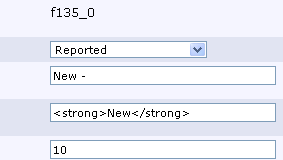
f135_0 is the prefixid for a certain prefix which can be set by yourself.
To show how this can be handy, i will provide a short how-to about using prefixes for moderation.
Moderation with prefixes:
1) Choosing a forum for reports
In the vbulletin settings you can choose a forum to which all reported threads are sent. For e.g. we call this "Reports".
2) Setting prefixes for this forum
a) Add a prefix category named "Reports" and tie it to the "Reports" forum
b) set different states for moderation
in this example we have New, Done, Discuss and Nothing
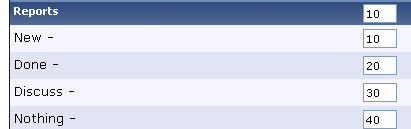
In this example the prefix ids where set according to the forum where the reports go. The id of the forum is 135 and therefore ids for the prefixes are 135_0, 135_1 ....
3) Change class_reportitem.php
The standard prefix for new reported threads is "New" so we use the id of this prefix in the file class_reportitem.php as shown above.
4) Use "Change prefixes with AJAX" hack
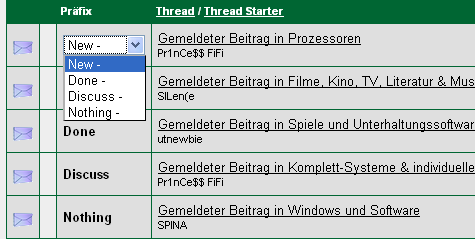
If you add the "Change prefixes with AJAX" hack you can edit the prefixes like this:
You have to add a piece of code to the file "class_reportitem.php" which is located in the includes folder.
Code:
After line 242 or "$threadman->set('visible', 1);"
add this:
$threadman->set('prefixid', 'f135_0');
To show how this can be handy, i will provide a short how-to about using prefixes for moderation.
Moderation with prefixes:
1) Choosing a forum for reports
In the vbulletin settings you can choose a forum to which all reported threads are sent. For e.g. we call this "Reports".
2) Setting prefixes for this forum
a) Add a prefix category named "Reports" and tie it to the "Reports" forum
b) set different states for moderation
in this example we have New, Done, Discuss and Nothing
In this example the prefix ids where set according to the forum where the reports go. The id of the forum is 135 and therefore ids for the prefixes are 135_0, 135_1 ....
3) Change class_reportitem.php
The standard prefix for new reported threads is "New" so we use the id of this prefix in the file class_reportitem.php as shown above.
4) Use "Change prefixes with AJAX" hack
If you add the "Change prefixes with AJAX" hack you can edit the prefixes like this:
Download
No files for download.
Screenshots