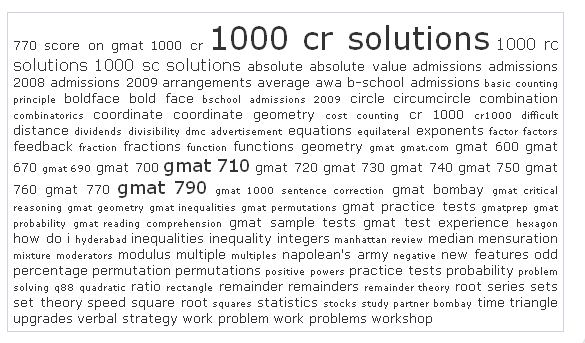
Tag cloud block for vbdrupal
Mod Version: 0.1, by redraider
This modification is in the archives.
| vB Version: 3.7.x | Rating:  (1 vote - 5.00 average) (1 vote - 5.00 average) |
Installs: 5 |
| Released: 27 Jun 2008 | Last Update: Never | Downloads: 0 |
 Not Supported Not Supported
 Template Edits
Re-usable Code
Translations
Is in Beta Stage Template Edits
Re-usable Code
Translations
Is in Beta Stage
|
||
This is my first mod to be released in vb org. Its a simple mod which helps you to show vbulletin tags in a vbdrupal block. If you have suggestions to improve, please drop them in here. Please note the vbdrupal 5.7 is compatible with vb3.7.x hence I have released this mod here. here.
What does it do:
This hack is for tagging feature introduced in vb3.7x. It uses vbulletin's tag cloud templates to show a tag cloud on drupal block:
Steps to Install
Backup
- Make sure you have vbdrupal installed and working
- Make sure you have vbulletin 3.7.x installed and working. This mod will not work with vb 3.6.x since tagging was introduced only in vb 3.7
- Make sure you take a backup
Install
1: Drupal admin -> Add block
2: Select input format as phpcode
3: (you can change the CSS part to your liking)
Try the default one first, but you may need to change the BOLD line above to suite you directory structure, t. Make sure php is selected as input format.
4: Save block
5: (Optional to make the box look better), Recommended to use template modification system plugin.
Edit template: tag_cloud_box_search
Find and delete:
What does it do:
This hack is for tagging feature introduced in vb3.7x. It uses vbulletin's tag cloud templates to show a tag cloud on drupal block:
Steps to Install
Backup
- Make sure you have vbdrupal installed and working
- Make sure you have vbulletin 3.7.x installed and working. This mod will not work with vb 3.6.x since tagging was introduced only in vb 3.7
- Make sure you take a backup
Install
1: Drupal admin -> Add block
2: Select input format as phpcode
3: (you can change the CSS part to your liking)
Code:
<style type="text/css">
a.tagcloudlink:link, a.tagcloudlink:visited { text-decoration:none; }
a.tagcloudlink:hover, a.tagcloudlink:active { text-decoration:underline; }
a.level1 { font-size: xx-small; }
a.level2 { font-size: small; }
a.level3 { font-size: medium; }
a.level4 { font-size: large; }
a.level5 { font-size: xx-large; }
</style>
<?php global $vbulletin;
if ($vbulletin->options['threadtagging'] == 1 AND $vbulletin->options['tagcloud_searchcloud'] == 1)
{
	require_once(DIR . '/includes/functions_search.php');
	$tcloud = fetch_tagcloud('search');
}
else
{
	$tcloud = '';
}
echo $tcloud;
?>
4: Save block
5: (Optional to make the box look better), Recommended to use template modification system plugin.
Edit template: tag_cloud_box_search
Find and delete:
Code:
<tr>
	<td class="tcat">
		<div class="smallfont" style="float:$stylevar[right]"><phrase 1="$cloud[count]">$vbphrase[these_are_the_x_most_searched_thread_tags]</phrase></div>
		$vbphrase[search_tag_cloud]
	</td>
</tr>
Download
No files for download.
Screenshots