Toggle Products
Mod Version: 1.01, by Mutt
This modification is in the archives.
| vB Version: 3.7.1 | Rating:  (0 vote - 0 average) (0 vote - 0 average) |
Installs: 5 |
| Released: 21 Jun 2008 | Last Update: Never | Downloads: 7 |
 Not Supported Not Supported
 Code Changes
Re-usable Code Code Changes
Re-usable Code
|
||
Toggle Products v1.01
Made by Mutt
06-21-08
------------------------
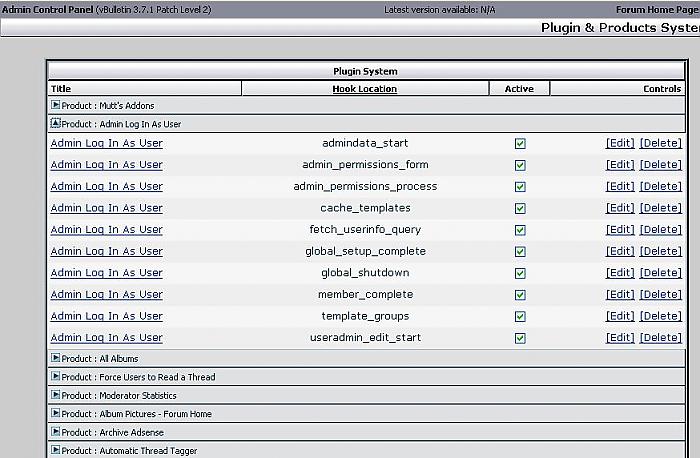
This lets you collapse the plugins at the product headers of the Plugin Manager. it makes it easy for you to flip thru your installed products and locate a plugin.
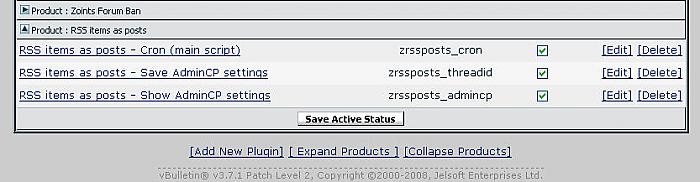
It now has "Expand All" & "Collapse All" links at the bottom of the page next to "Add New Plugin". Also after you save a plugin, when you are brought back to the main plugin page the product that you were working on is open.
------------------------
v1 initial release
v1.01 added [Expand All] & [Collapse All] links
------------------------
I have this running on 3.71
INSTALL
time for the bad news, there's no pretty product or plugin here. you have to edit forum/admincp/plugin.php in 2 places
find
and replace it with
look for
replace it with
look for
replace it with
please bear with me because it's been a loooong time since I released anything. if there's an easier way to do this, I'm all ears.
NOTE: toggle.js is a tiny chuck of javascript lifted from includes/adminfunctions_navpanel.php. if this is bad form, please let me know how to release this properly.
Made by Mutt
06-21-08
------------------------
This lets you collapse the plugins at the product headers of the Plugin Manager. it makes it easy for you to flip thru your installed products and locate a plugin.
It now has "Expand All" & "Collapse All" links at the bottom of the page next to "Add New Plugin". Also after you save a plugin, when you are brought back to the main plugin page the product that you were working on is open.
------------------------
v1 initial release
v1.01 added [Expand All] & [Collapse All] links
------------------------
I have this running on 3.71
INSTALL
time for the bad news, there's no pretty product or plugin here. you have to edit forum/admincp/plugin.php in 2 places
find
Code:
	// stuff to handle the redirect
	define('CP_REDIRECT', 'plugin.php');
	print_stop_message('saved_plugin_successfully');
Code:
	// stuff to handle the redirect
	define('CP_REDIRECT', 'plugin.php?open='.$vbulletin->GPC['product']);
	print_stop_message('saved_plugin_successfully');
look for
Code:
				$prevgroup = $product['title'];
				print_description_row("$vbphrase[product] : " . $product['title'], 0, 4, 'tfoot');
Code:
				if ($prevgroup) {
					echo "</tbody>";
					$allproducts.="','";
				}
				$allproducts.=$product[productid];
				$prevgroup = $product['title'];
				$button="<a href=\"#top\" target=\"_self\" onclick=\"toggle_group('".$product[productid]."'); return false;\"><img src=\"../cpstyles/vBulletin_3_Silver/cp_expand.gif\" title=\"Expand Group\" id=\"button_".$product[productid]."\" alt=\"\" border=\"0\"></a>";
				print_description_row("$button $vbphrase[product] : " . $product['title'], 0, 4, 'tfoot');
				echo '<tbody id="group_'.$product[productid].'" style="display: none;">';
look for
Code:
	print_submit_row($vbphrase['save_active_status'], false, 4);
	echo '<p align="center">' . construct_link_code($vbphrase['add_new_plugin'], "plugin.php?" . $vbulletin->session->vars['sessionurl'] . "do=add") . '</p>';
Code:
	if ($group_by == 'product') {
		echo "</tbody>";
	}
	print_submit_row($vbphrase['save_active_status'], false, 4);
if ($group_by == 'product') {
	$controls = " <a href=\"#top\" target=\"_self\" onclick=\"expand_all_groups(1); return false;\">[ Expand Products ]</a> <a href=\"#top\" target=\"_self\" onclick=\"expand_all_groups(0); return false;\">[Collapse Products]</a>";
	$vbulletin->input->clean_array_gpc('r', array(
		'open' => TYPE_NOHTML
	));
	?>
	<script type="text/javascript">
	<!--
	var files = new Array('<?php echo $allproducts; ?>');
	<?php
	if ($vbulletin->GPC['open']) {
		echo "open_close_group('".$vbulletin->GPC['open']."', 1)";
	}
	?>
	function expand_all_groups(doOpen)
	{
    	for (var i = 0; i < files.length; i++) {
			open_close_group(files[i], doOpen);
		}
	}
	function open_close_group(group, doOpen)
	{
		var curdiv = fetch_object("group_" + group);
		var curbtn = fetch_object("button_" + group);
		if (doOpen)
		{
			curdiv.style.display = "";
			curbtn.src = "../cpstyles/vBulletin_3_Silver/cp_collapse.gif";
			curbtn.title = "";
		}
		else
		{
			curdiv.style.display = "none";
			curbtn.src = "../cpstyles/vBulletin_3_Silver/cp_expand.gif";
			curbtn.title = "";
		}
	}
	function toggle_group(group)
	{
		var curdiv = fetch_object("group_" + group);
		if (curdiv.style.display == "none")
		{
			open_close_group(group, true);
		}
		else
		{
			open_close_group(group, false);
		}
	}
	//-->
	</script>
	<?php
}
	echo '<p align="center">' . construct_link_code($vbphrase['add_new_plugin'], "plugin.php?" . $vbulletin->session->vars['sessionurl'] . "do=add") . $controls .'</p>';
please bear with me because it's been a loooong time since I released anything. if there's an easier way to do this, I'm all ears.
NOTE: toggle.js is a tiny chuck of javascript lifted from includes/adminfunctions_navpanel.php. if this is bad form, please let me know how to release this properly.
Download
No files for download.
Screenshots