MySpace Style Profile Links PLUS
Mod Version: 2.00, by MiahBeSmokin420
This modification is in the archives.
| vB Version: 3.7.0 | Rating:  (2 votes - 5.00 average) (2 votes - 5.00 average) |
Installs: 29 |
| Released: 12 May 2008 | Last Update: 12 May 2008 | Downloads: 100 |
 Not Supported Not Supported
 Template Edits
Additional Files Template Edits
Additional Files
|
||
MySpace Style Profile Links PLUS
Only tested on a linux server and will only work if you can use .htaccess files (Rewrite Conditions) on your server.
What this will do:
It gives your members a simple and easy link to remember and give to there friends to get to there profile.
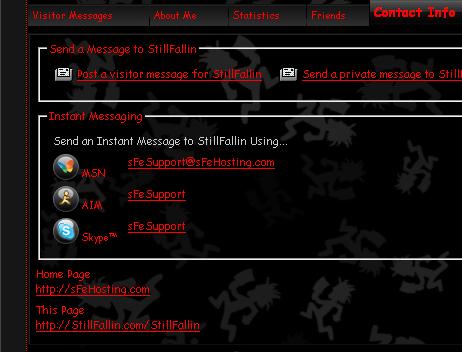
Also changes the profile link in members profiles contact us tab from the long ugly link to the new short sexy link.
Also Adds a nicely placed User Profile link to the top of the navbar with profile editing links.
DEMO:
This link:
http://StillFallin.com/StillFallin
Will take you to this link:
http://stillfallinentertainment.com/vB-Forums/member.php?username=StillFallin
Screen Shots Attached
vB 3.6.x Version:
MySpace type User Profile Link
(Step 1) File Edits
Open your Favorite FTP software
Go to the root of your domain you wish to use as a jump point
Example: /public_html/
Find and open your .htaccess file
Note if you do not have one then create one
Add in the .htaccess file:
Edit this line here:
RewriteRule ^(.*)$ http://Example.com/Forums/member.php?username=$1 [R]
Just replace:
With your forum domain and forum folder
Save, close, and upload back to the server unless you did live edits on the server in that case just close and save.
NOTE:
If you have more then one domain you can add the .htaccess file to other domains as well.
For Example:
My forums are on MyLongDomain.com
But i added the .htaccess file to MyShortDomain.com
Now go to:
Note:
If there are spaces in your user name you must enter the spaces in the link as well
Same goes with other characters like if you have ---User Name---
You Would Enter:
That should then redirect you to your profile.
If that works correctly then move on to Step 2
(Step 2) Template Edites
Go to your vB Forums Admin cP > Style Manager > Navigation / Breadcrumb Templates
Open navbar
Before:
Add:
Edit:
Changing the font color to match you site. Currently it its set to red.
Edit 2 times:
Replace both with the domain that you put the .htaccess file in.
Save and Close
Go to your vB Forums Admin cP > Style Manager > Member Info Templates
Open memberinfo_block_contactinfo
Find:
Replace With:
Edit 2 times:
Replace both with the domain that you put the .htaccess file in.
Save and Close
To get a Sexier looking error page for when a member dose not exist you can do the following edit.
Search in Phases for:
Edit and replace with:
Only tested on a linux server and will only work if you can use .htaccess files (Rewrite Conditions) on your server.
What this will do:
It gives your members a simple and easy link to remember and give to there friends to get to there profile.
Also changes the profile link in members profiles contact us tab from the long ugly link to the new short sexy link.
Also Adds a nicely placed User Profile link to the top of the navbar with profile editing links.
DEMO:
This link:
http://StillFallin.com/StillFallin
Will take you to this link:
http://stillfallinentertainment.com/vB-Forums/member.php?username=StillFallin
Screen Shots Attached
vB 3.6.x Version:
MySpace type User Profile Link
(Step 1) File Edits
Open your Favorite FTP software
Go to the root of your domain you wish to use as a jump point
Example: /public_html/
Find and open your .htaccess file
Note if you do not have one then create one
Add in the .htaccess file:
Code:
<MySpace Style Profile Link>
RewriteEngine On
RewriteCond %{REQUEST_FILENAME} !-f
RewriteCond %{REQUEST_FILENAME} !-d
RewriteRule ^(.*)$ http://Example.com/Forums/member.php?username=$1 [R]
</MySpace Style Profile Link>
RewriteRule ^(.*)$ http://Example.com/Forums/member.php?username=$1 [R]
Just replace:
Code:
Example.com/Forums/
Save, close, and upload back to the server unless you did live edits on the server in that case just close and save.
NOTE:
If you have more then one domain you can add the .htaccess file to other domains as well.
For Example:
My forums are on MyLongDomain.com
But i added the .htaccess file to MyShortDomain.com
Now go to:
Code:
http://Example.com/User Name
If there are spaces in your user name you must enter the spaces in the link as well
Same goes with other characters like if you have ---User Name---
You Would Enter:
Code:
http://Example.com/---User Name---
If that works correctly then move on to Step 2
(Step 2) Template Edites
Go to your vB Forums Admin cP > Style Manager > Navigation / Breadcrumb Templates
Open navbar
Before:
Code:
<!-- breadcrumb, login, pm info -->
Code:
<!-- MySpace Style Profile Link -->
<if condition="$show['member']">
<div align="center">
<table width="100%" align="center">
<tr>
<td width="100%" align="left">
<font color="#FF0000">
My Profile Url: <a href="http://StillFallin.com/$bbuserinfo[username]">StillFallin.com/$bbuserinfo[username]</a>  [<a href="profile.php?$session[sessionurl_q]do=customize">Customize</a>]-[<a href="profile.php?$session[sessionurl_q]do=editprofile">My Details</a>]-[<a href="album.php?$session[sessionurl_q]">My Albums</a>]-[<a href="profile.php?$session[sessionurl_q]do=editprofilepic">My Pic</a>]
</font>
</td>
</tr>
</table>
</div>
</if>
<!-- / MySpace Style Profile Links -->
Edit:
Code:
<font color="#FF0000">
Edit 2 times:
Code:
Example.com
Save and Close
Go to your vB Forums Admin cP > Style Manager > Member Info Templates
Open memberinfo_block_contactinfo
Find:
Code:
<a href="$prepared[profileurl]">$prepared[profileurl]</a>
Code:
<!-- MySpace Style Profile Link -->
<a href="http://Example.com/$prepared[username]">http://Example.com/$prepared[username]</a>
<!-- / MySpace Style Profile Link -->
Code:
Example.com
Save and Close
To get a Sexier looking error page for when a member dose not exist you can do the following edit.
Search in Phases for:
Code:
This user has not registered and therefore does not have a profile to view.
Code:
<center>This user has not registered and therefore does not have a profile to view. <BR><a href="memberlist.php" style="text-decoration: none;">Click Here</a> to view the Full Members List.</center>
NOW
Download
This modification is archived, downloads are still allowed.
 MySpace Profile Links PLUS.zip (1.6 KB, 102 downloads)
Screenshots