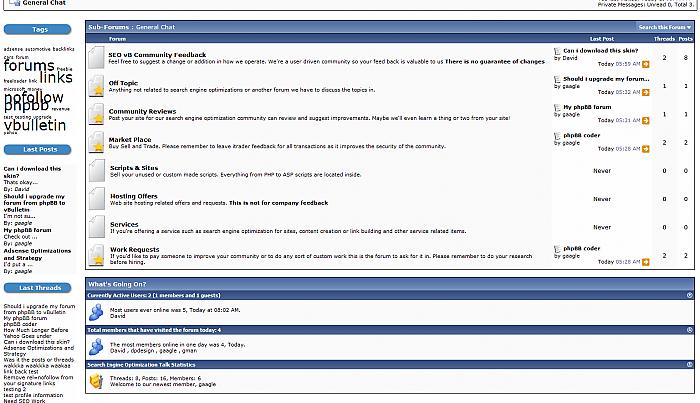
Whats going on Box on ForumDisplay (with working Stats!)
Mod Version: .099c, by SEOvB
This modification is in the archives.
| vB Version: 3.6.8 | Rating:  (1 vote - 3.00 average) (1 vote - 3.00 average) |
Installs: 6 |
| Released: 09 Apr 2008 | Last Update: Never | Downloads: 38 |
 Not Supported Not Supported
 Uses Plugins
Template Edits
Re-usable Code Uses Plugins
Template Edits
Re-usable Code
|
||
//////////////////////////////////////////////////////////////////////////////
//// Bought To You By: http://seovb.com/discussion
//// Help from whitemike and opserty
/////////////////////////////////////////////////////////////////////////////
This modification will allow you to show the whats going on box on forumdisplay pages http://seovb.com/discussion/f6/
See attachments for screenshots. Installation instructions are simple as placing $forumdisplay_stats into your forumdisplay template.
Install Instructions.
1. Download product attached.
2. Login to your adminCP and add the product via the product manager
3. Open your forumdisplay template and add the following code where you want it to appear
4. Enjoy the little added feature.
Info: This has 3 plugins, and will create a few additonal queries on forumdisplay pages, though they shouldn't be server intensive.
Where is a good place to add the $forumdisplay_stats code?
I've added mine after this code in forumdisplay
Why is this version Mod Version: .099c
Because that box let me put whatever i wanted in. And that sounded the coolest
What does it do?
This product will let you insert the whats going on box on forumdisplay. Current the only things that will appear are Who's Online, if you have Paul M's users visited in last 24hrs, and the forum stats box.
Why did you make this?
There have been numerous posts, and even paid requests for such a product but I've never seen one released, plus it looks cool on my forums
Will you make me something cool?
No
Can You Release That Awesome Skin?
No and it probably never will be
Do you have screenshots?
Yes! See attachments
Can you add users birthdays and events to this?
Perhaps in a future release if there is demand for it.
What If I don't Have Paul M's plugin installed?
Who doesn't these days?! But open up the newly created forumhome_stats template and remove
What If i want to add/remove something else to the block?
Open up the forumdisplay_stats template and modify it as you see fit.
Were all these FAQ neccassary
Probably not, but I see everyone else doing it, and I wanted a long meaningful release thread as well.
//// Bought To You By: http://seovb.com/discussion
//// Help from whitemike and opserty
/////////////////////////////////////////////////////////////////////////////
This modification will allow you to show the whats going on box on forumdisplay pages http://seovb.com/discussion/f6/
See attachments for screenshots. Installation instructions are simple as placing $forumdisplay_stats into your forumdisplay template.
Install Instructions.
1. Download product attached.
2. Login to your adminCP and add the product via the product manager
3. Open your forumdisplay template and add the following code where you want it to appear
Code:
$forumdisplay_stats
Info: This has 3 plugins, and will create a few additonal queries on forumdisplay pages, though they shouldn't be server intensive.
FAQ
Where is a good place to add the $forumdisplay_stats code?
I've added mine after this code in forumdisplay
Code:
</thead>
$forumbits
</table>
<br />
Because that box let me put whatever i wanted in. And that sounded the coolest
What does it do?
This product will let you insert the whats going on box on forumdisplay. Current the only things that will appear are Who's Online, if you have Paul M's users visited in last 24hrs, and the forum stats box.
Why did you make this?
There have been numerous posts, and even paid requests for such a product but I've never seen one released, plus it looks cool on my forums
Will you make me something cool?
No
Can You Release That Awesome Skin?
No and it probably never will be
Do you have screenshots?
Yes! See attachments
Can you add users birthdays and events to this?
Perhaps in a future release if there is demand for it.
What If I don't Have Paul M's plugin installed?
Who doesn't these days?! But open up the newly created forumhome_stats template and remove
Code:
<!-- Paul M's WHO VISITED TODAY -->
<tbody>
	<tr>
		<td class="thead" colspan="2">
			<a style="float:$stylevar[right]" href="#top" onclick="return toggle_collapse('forumhome_todayusers')"><img id="collapseimg_forumhome_todayusers" src="$stylevar[imgdir_button]/collapse_thead$vbcollapse[collapseimg_forumhome_todayusers].gif" alt="" border="0" /></a>
			$whotitle
		</td>
	</tr>
</tbody>
<tbody id="collapseobj_forumhome_todayusers" style="$vbcollapse[collapseobj_forumhome_todayusers]">
	<tr>
		<td class="alt2"><a href="memberlist.php"><img src="$stylevar[imgdir_misc]/whos_online.gif" alt="" border="0" /></a></td>
		<td class="alt1" width="100%"><div class="smallfont">$whotoday</div></td>
	</tr>
</tbody>
<!-- PAUL M WHO VISITED TODAY -->
Open up the forumdisplay_stats template and modify it as you see fit.
Were all these FAQ neccassary
Probably not, but I see everyone else doing it, and I wanted a long meaningful release thread as well.
Download
This modification is archived, downloads are still allowed.
 product-2343whoonline232.xml (9.3 KB, 37 downloads)
Screenshots