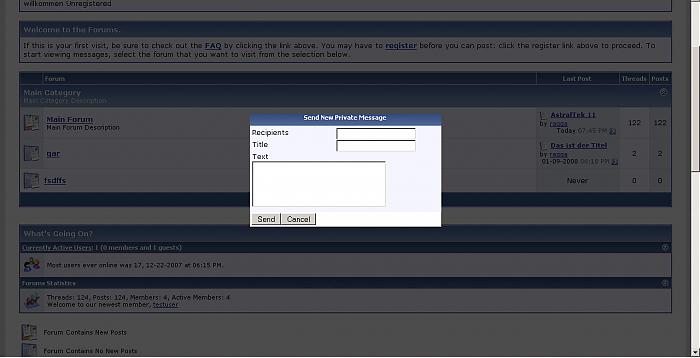
pm popup
Mod Version: 0.70, by ragtek
This modification is in the archives.
| vB Version: 3.7.5 | Rating:  (3 votes - 5.00 average) (3 votes - 5.00 average) |
Installs: 31 |
| Released: 19 Jan 2008 | Last Update: Never | Downloads: 198 |
 Not Supported Not Supported
 Uses Plugins
Template Edits
Translations
Is in Beta Stage Uses Plugins
Template Edits
Translations
Is in Beta Stage
|
||
this is my "little" pm popup window which is available on every page!
you just need to press alt + n to open it(at moment opera isn't supported)
also a link in the footer is available where you can click to open it
ATM THIS is a BETAVERSION!
Here a little demovideo: http://www.ragtek.org/videos/pmpopupnew.htm
Only the first part includes this add-on, the second part with the new notification is in an other add-on which hasn't been released atm!
If you haven't installed tms you need to add this into your headinclude template:
search for:
<script type="text/javascript" src="clientscript/vbulletin_global.js?v=$vboptions[simpleversion]"></script> and add under it:
and in footer search for: <form action="$vboptions[forumhome].php" method="get"> and add under it:
Known Bugs: In Opera alt + n don't open the popup
in some cases the namesuggestbox don't appear where it should, thats a "bug" in vbulletin.
this little fileedit: http://www.vbulletin-germany.com/forum/showpost.php?p=172546&postcount=2 helps
http://www.vbulletin.com/forum/project.php?issueid=24367
you just need to press alt + n to open it(at moment opera isn't supported)
also a link in the footer is available where you can click to open it
ATM THIS is a BETAVERSION!
Here a little demovideo: http://www.ragtek.org/videos/pmpopupnew.htm
Only the first part includes this add-on, the second part with the new notification is in an other add-on which hasn't been released atm!
If you haven't installed tms you need to add this into your headinclude template:
search for:
<script type="text/javascript" src="clientscript/vbulletin_global.js?v=$vboptions[simpleversion]"></script> and add under it:
Code:
<link rel="stylesheet" type="text/css" href="clientscript/yui/container/container.css">
<script type="text/javascript" src="clientscript/yui/container/container-min.js"></script>
Code:
<style type="text/css">
.label2 { display:block;float:left;width:45%;clear:left; }
.clear { clear:both; }
#dialog1_c.yui-panel-container.shadow .underlay { background-color:$stylevar[page_bgcolor]; }
#dialog1.yui-panel { position:relative; border:none; overflow:visible; background-color:transparent; width:400px; }
#dialog1.yui-panel .hd { padding:0; border:none; height:22px; margin-left:0px; margin-right:0px; text-align:center; overflow:visible; }
#dialog1.yui-panel .bd {height: 150px; overflow:hidden; padding:4px; }
#dialog1.yui-panel .ft { color:#666; padding:2px; overflow:hidden; border:1px solid #aeaeae; border-top:none; background-color:$stylevar[page_bgcolor]; }
.mask { background-color:#000000;opacity:0.7;}
</style>
<script type="text/javascript">
<!--
vbphrase["send"]="$vbphrase[send]";
vbphrase["cancel"]="$vbphrase[cancel]";
vbphrase["rec"]="$vbphrase[rag_invalidrec]";
-->
</script>
<script type="text/javascript" src="clientscript/ragteknewpm.js?ver=1"></script>
<script type="text/javascript" src="clientscript/vbulletin_ajax_namesugg.js"></script>
<a href="private.php?do=newpm" id="ragtek_newpm">$vbphrase[send_new_message]</a>
<div id="dialog1" style="display:none">
<div class="hd thead">$vbphrase[post_new_private_message]</div>
<div class="bd alt1">
<form method="POST" action="ajax.php?do=sendnewpm">
<div id="pmrecips1">
<label for="empaenger" class="label2">$vbphrase[recipients]</label><input type="textbox" id="pmrecips1_txt" name="empfaenger" tabindex="1" /><div class="vbmenu_popup" id="pmrecips1_menu" style="display:none;"></div>
<script type="text/javascript">
<!--
vbmenu_register('pmrecips1', true);
recip1_sugg = new vB_AJAX_NameSuggest('recip1_sugg', 'pmrecips1_txt', 'pmrecips1');
recip1_sugg.allow_multiple = true;
//-->
</script>
</div>
<div><label for="title" class="label2">$vbphrase[title]</label><input type="textbox" name="title" /></div>
<label for="message" class="label2">$vbphrase[text]</label><textarea name="message" cols="30" rows="4"></textarea>
</form>
</div>
<div class="ft">© ragtek.org</div>
</div>
in some cases the namesuggestbox don't appear where it should, thats a "bug" in vbulletin.
this little fileedit: http://www.vbulletin-germany.com/forum/showpost.php?p=172546&postcount=2 helps
http://www.vbulletin.com/forum/project.php?issueid=24367
Download
This modification is archived, downloads are still allowed.
 ragtek_newpmwindow_0-70.zip (23.7 KB, 206 downloads)
Screenshots