UA Sidebar 3.0.6 for VB 3.6.x - VB 3.7 Beta 3
Mod Version: 3.0.6, by jaks
This modification is in the archives.
| vB Version: 3.6.8 | Rating:  (2 votes - 5.00 average) (2 votes - 5.00 average) |
Installs: 13 |
| Released: 06 Jan 2008 | Last Update: 07 Jan 2008 | Downloads: 113 |
 Not Supported Not Supported
 Uses Plugins
Template Edits Uses Plugins
Template Edits
|
||
CSS Issues were addressed in UAsidebar Version 3.0.5 Please make sure to update your CSS code for your style, upload the newest product and overwrite the previous versions.
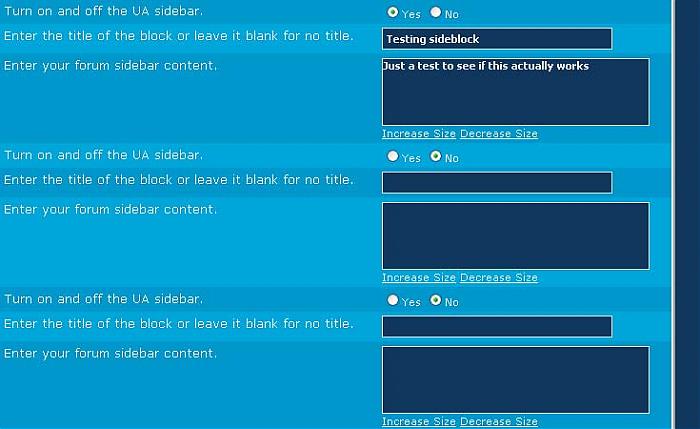
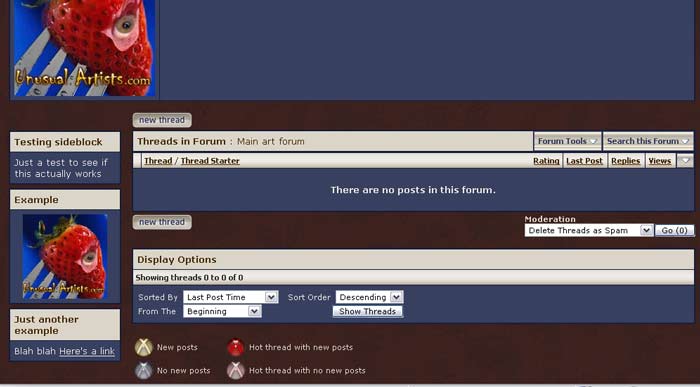
A simple variation of the Forum Intro Mod. This will add upto 3 blocks as a sidebar on your forum index pages. Each forum would have it's own 1-3 bocks. You can turn them on or off. Block 1 is the Key block, if it is not enabled no blocks will show regardless of how blocks 2 and 3 are set.
This is the second version and is labelled 3.0.1. 3.0.0 Had an issue with the new profiles. Apparently I used the same name for my wrapper as it does so i quickly changed it.
This will also work with VB 3.6.x
Add your block code in Admincp >>> Forum Manager >>> Whatever Forum near the bottom of the options.
Template edits must be made. Instructions are below. Each edit is clearly labelled to make it easy to find in or remove from your templates.
*** Advertising removed ***
UA_Sidebar Update 3.0.6 changes:
Known Bugs
CSS CODE
#############################
*Note* You will have to adjust the top margin to line up with your style. 26px worked for me but you may need more or less to line up with the navbar.*END NOTE*
Add this CSS code to the bottom of the Additional CSS Definitions box for the style you are using.
For a left sidebar
For a right sidebar
###############################
In the forumdisplay template find
For a left sidebar Add below:
For a right sidebar Add below:
(If you used my Forum Intro hack place above or below <!-- / End Forum Intro --> )
####################
In footer template find
Above Add:
A simple variation of the Forum Intro Mod. This will add upto 3 blocks as a sidebar on your forum index pages. Each forum would have it's own 1-3 bocks. You can turn them on or off. Block 1 is the Key block, if it is not enabled no blocks will show regardless of how blocks 2 and 3 are set.
This is the second version and is labelled 3.0.1. 3.0.0 Had an issue with the new profiles. Apparently I used the same name for my wrapper as it does so i quickly changed it.
This will also work with VB 3.6.x
Add your block code in Admincp >>> Forum Manager >>> Whatever Forum near the bottom of the options.
Template edits must be made. Instructions are below. Each edit is clearly labelled to make it easy to find in or remove from your templates.
*** Advertising removed ***
UA_Sidebar Update 3.0.6 changes:
- Added a right sidebar template and CSS for it. (Requested)
- CSS bug fixed a slight change in the CSS code.
- 1 template change to address CSS issue.
- Added missing wrapit div and CSS
- Templates now included in product file
- Changed Div ID to UAsidebar so it doesn't conflict with other mods past/present/future.
If updating you must change #sidebar to #UAsidebar in your CSS - Overwrite Product is now possible.
- Edits are easier with less code to paste
- Each forum can have it's own 1,2 or 3 sidebar blocks controlled in Forum Management
- You can edit the templates to your needs.
- Optional product file that will include Auto Template edits
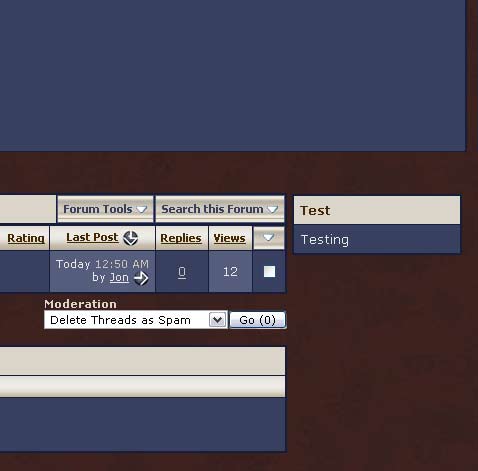
- Option to move sidebar to the right side
- Last x posts in specific forum (No promises)
- Default sidebar for all forums (No promises)
- Users in this forum (No promises)
Known Bugs
- [FIXED IN 3.0.5]Thread list goes off the page a 165px in Firefox as of Version 3.0.4.
- [FIXED IN 3.0.5]Sidebar sits above Threadlist in IE as of Version 3.0.4.
CSS CODE
#############################
*Note* You will have to adjust the top margin to line up with your style. 26px worked for me but you may need more or less to line up with the navbar.*END NOTE*
Add this CSS code to the bottom of the Additional CSS Definitions box for the style you are using.
For a left sidebar
Code:
/* Start UASidebar Left CSS */
#UAcontent
{ margin-left: 175px; }
body
{ height: 100%; overflow: auto; }
#UAsidebar
{ float:left; margin-top: 26px; width: 175px; }/* END UA Sidebar CSS */
/* End UA Sidebar Left CSS */
Code:
/* Start UASidebar Right CSS */
#UAcontentright
{ margin-right: 180px; }
body
{ height: 100%; overflow: auto; }
#UAsidebarright
{ float:right; margin-top: 26px; width: 175px; }
/* End UA Sidebar Right CSS */
###############################
In the forumdisplay template find
Code:
$navbar
Code:
<!-- Start UA Sidebar Left Top  -->
$ua_sidebar_forumdisplay_bit
<!-- / End UA Sidebar Top  -->
Code:
<!-- Start UA Sidebar Right Top  -->
$ua_sidebar_forumdisplay_bit_right
<!-- / End UA Sidebar Top  -->
####################
In footer template find
Code:
$spacer_close
Code:
<!-- Start UA Sidebar bottom -->
$ua_sidebar_footbit
<!-- End UA Sidebar Bottom -->
Download
This modification is archived, downloads are still allowed.
 UA_Sidebar_3.0.1.zip (2.3 KB, 46 downloads) UA_Sidebar_3.0.5.zip (2.5 KB, 18 downloads) UA_Sidebar_3.0.6.zip (2.7 KB, 75 downloads)
Screenshots