Scr - ColorizeBoards
Mod Version: 1.00, by D&Y
This modification is in the archives.
| vB Version: 3.6.7 | Rating:  (2 votes - 5.00 average) (2 votes - 5.00 average) |
Installs: 21 |
| Released: 01 Jan 2008 | Last Update: Never | Downloads: 126 |
 Not Supported Not Supported
 Uses Plugins
Code Changes Uses Plugins
Code Changes
|
||
What does this Plugin do?
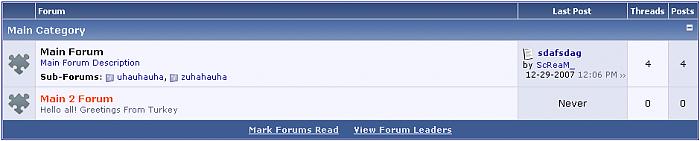
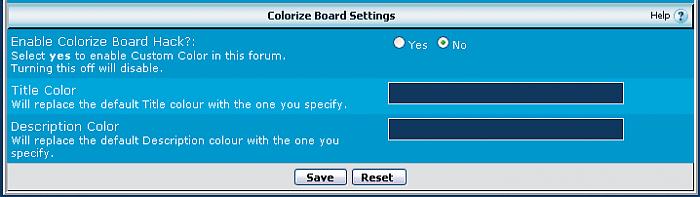
This will allow you to have custom colours for your forum - When set to off you default to the original colours.
Installation Instructions
Step 1: Upload the .xml file to the Product Manager
Step 2: Read the install.txt file for template edit instructions
Step 3: Go To Admincp -> Styles & Templates -> Style Manager -> Your Style -> Main CSS
Edit Alt1 & Alt2 Options in this way ;
Normal Links CSS -> Text Decoration -> none
Visited Links CSS -> Text Decoration -> none
Hover Links CSS -> Text Decoration -> underline
Step 3: Click INSTALL
Any Screenshots?
See post below
Version History:
1.0.0: First release
This will allow you to have custom colours for your forum - When set to off you default to the original colours.
Installation Instructions
Step 1: Upload the .xml file to the Product Manager
Step 2: Read the install.txt file for template edit instructions
Step 3: Go To Admincp -> Styles & Templates -> Style Manager -> Your Style -> Main CSS
Edit Alt1 & Alt2 Options in this way ;
Normal Links CSS -> Text Decoration -> none
Visited Links CSS -> Text Decoration -> none
Hover Links CSS -> Text Decoration -> underline
Step 3: Click INSTALL
Any Screenshots?
See post below
Version History:
1.0.0: First release
Download
This modification is archived, downloads are still allowed.
 product-scr_colorize_boards.xml (2.9 KB, 68 downloads)
 install.txt (873 Bytes, 82 downloads)
Screenshots