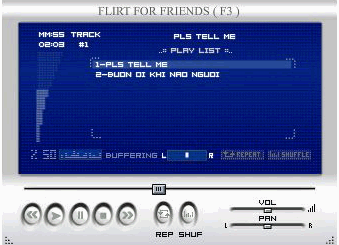
MP3 player ( new )
Mod Version: 1.00, by baha
This modification is in the archives.
| vB Version: 3.6.8 | Rating:  (0 vote - 0 average) (0 vote - 0 average) |
Installs: 9 |
| Released: 02 Aug 2007 | Last Update: Never | Downloads: 121 |
 Not Supported Not Supported
|
||
 is new yesterday design
+Upload all the files/folders inside to your forums root directory.
+The config.xml file is very self-explanatory, so not much in the way of documentation is really needed. For example:
<time_visible>true</time_visible>
Obviously, setting that to "false" will cause the applet to not display the timer information.
<default_volume>50</default_volume>
That's clearly the default volume setting (acceptable values are integers between 0 and 100, inclusive). And so on...
The only parameter that might cause some confusion is this one:
+<play_list>http://xxx/mtvpage-com/2006-11-29_yq23_Pls-tell-me-why.mp3,pls tell me why#http://xxx/mtvpage-com/buon-oi-khi-nao-nguoi_MBK.mp3,buon oi khi nao nguoi</play_list>
- color blue : is link , red : is song
-This is the actual playlist, as shown in the blue playlist window of the MP3 Player. You must separate the items of the playlist with commas, which means that you SHOULD NOT HAVE COMMAS IN THE MUSIC TITLE! That will confuse the applet. The "#" symbol separates the title from the path to the .mp3 file.
You must change the "config.xml" name in BOTH places! Of course, also rename the actual config.xml filename to the name of your choice.
+Find in navbar
PHP Code:
<td class="vbmenu_control"><a href="calendar.php$session[sessionurl_q]">$vbphrase[calendar]</a></td>
PHP Code:
<!-- mp3 players -->

<script type="text/javascript">

<!--


function OpeniPod(){

webcam = window.open('mp3player.htm','mp3player','directories=no,height=247,width=335,location=no,menubar=no,resizable=no,status=no,toolbar=no')


return false;

}


-->

</script>

<td class="vbmenu_control"><a href="#" onclick="return Openmp3player()">mp3player</a></td>

<!-- mp3 player -->

+++++++++++++++++
Download
This modification is archived, downloads are still allowed.
 F3_Mp3player.zip (81.7 KB, 126 downloads)
Screenshots