FTP *** File Manager
Mod Version: 1.6, by Deepdog009
This modification is in the archives.
| vB Version: 3.6.x | Rating:  (6 votes - 4.83 average) (6 votes - 4.83 average) |
Installs: 27 |
| Released: 01 Jun 2007 | Last Update: 03 Jun 2007 | Downloads: 186 |
 Not Supported Not Supported
 Additional Files Additional Files
|
||
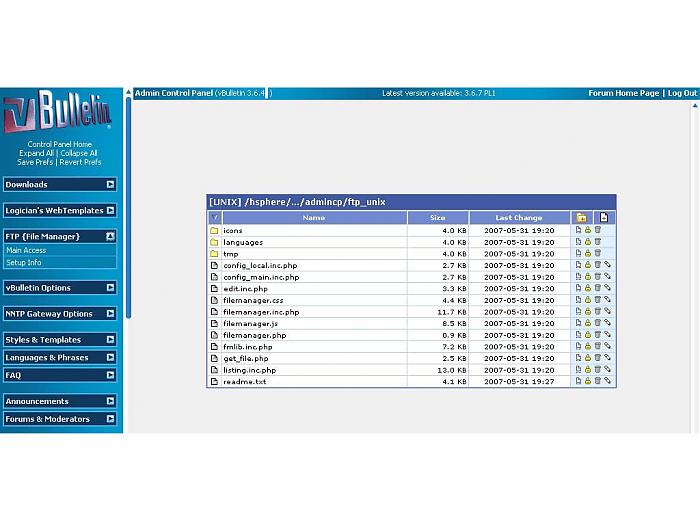
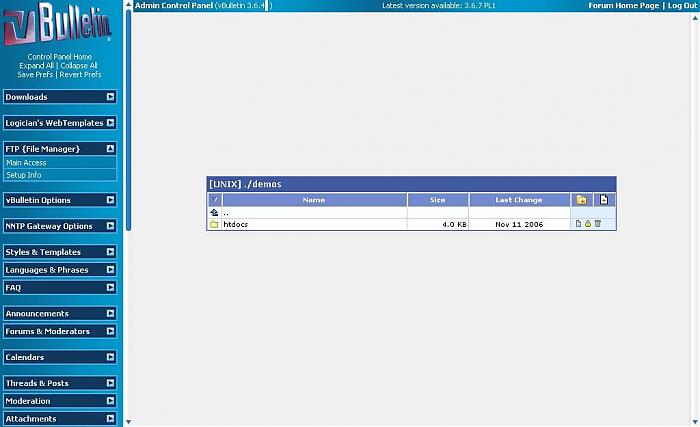
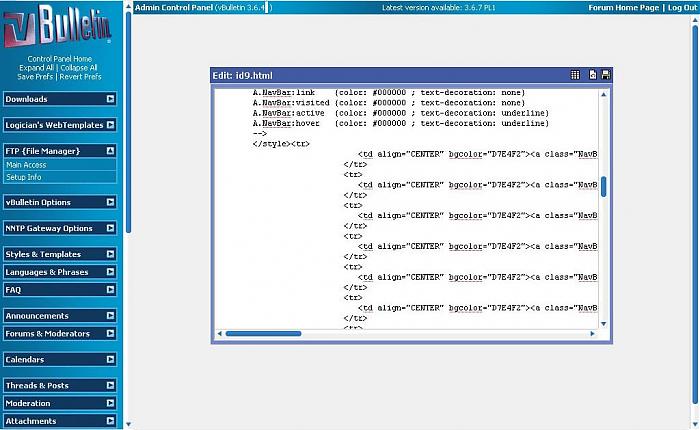
Admincp Tool 2 help with file editing
Upload both folders 2 forumroot...
Now U can access from non-admincp folder or change 2 whatever U like by way of xml...
Go 2 Admincp after uploads and refresh, look 4 FTP menu and check setup...
Use current folder setup or full FTP access by inserting { server, user, pass and choose lang }
Thanks it... Total about 5 min install...
All credit goes 2 http://www.gerd-tentler.de/
Please support his site by using this and other scripts. Check license...
Thank U!
Danke!
*****************************************
Use non admincp folder or move 2 your choice by way of xml updates... Enjoy the forums
Httaccess Tutorial...
Create a file in text editor and name it { .htaccess } then insert example info with your server path as stated below in examples. Check with your HOST for correct path to forums folders... Also U can use your HOST control panel to create these...
After finding correct path copy and paste in one of the examples below and then copy to .htaccess file and save.
Upload to folder U want to protect with User AuthName...
Next you will need to creat a password { .htpasswd } file.
Check below for more on .htpasswd files...
Example info below
*******************
# Begin password protection #
AuthName "Type in site info or whatever here"
Require valid-user
AuthUserFile "/home/users/web/htdocs/forums/ftp_unix/.htpasswd"
AuthType basic
# End password protection #
*******************
# Begin password protection #
AuthName "Type in name here"
Require valid-user
AuthUserFile "/home/users/web/x123/htdocs/forums/ftp_unix/.htpasswd"
AuthType basic
# End password protection #
********************
# Begin password protection #
AuthName "Type in name or whatever here"
Require valid-user
AuthUserFile "/home/users/htdocs/forums/ftp_unix/.htpasswd"
AuthType basic
# End password protection #
********************
# Begin password protection #
AuthName "Password Protected"
Require valid-user
AuthUserFile "/hsphere/local/home/siteuser_id/yoursite.org/forums/ftp_unix/.htpasswd"
AuthType basic
# End password protection #
********************
Creating a .htaccess password file is required to verify password to AuthName.
Create a text file and save it as { .htpasswd } then save and insert new password info created by password maker. Password should look like one of the examples below.
Thats it!
Example info below
*******************
siteadmin:96W2uYoO3AysI
webmaster:x23QymoKMvJ5I
admin:u6HPg4oKMvys4
sysmgr:8h7Iy3UrMv9CI
Its possible that your HOST coniguration may be somewhat different than info here. If so use your HOST's htaccess file creator.
Below are two links to help with creating passwords to AuthName .htaccess file.
http://www.seodoctor.com/admin/htaccess_maker.htm
http://www.kxs.net/support/htaccess_pw.html
Download Fix below
Good Luck
Upload both folders 2 forumroot...
Now U can access from non-admincp folder or change 2 whatever U like by way of xml...
Go 2 Admincp after uploads and refresh, look 4 FTP menu and check setup...
Use current folder setup or full FTP access by inserting { server, user, pass and choose lang }
Thanks it...
Total about 5 min install...All credit goes 2 http://www.gerd-tentler.de/
Please support his site by using this and other scripts. Check license...
Thank U!
Danke!
*****************************************
Use non admincp folder or move 2 your choice by way of xml updates... Enjoy the forums
Httaccess Tutorial...
Create a file in text editor and name it { .htaccess } then insert example info with your server path as stated below in examples. Check with your HOST for correct path to forums folders... Also U can use your HOST control panel to create these...
After finding correct path copy and paste in one of the examples below and then copy to .htaccess file and save.
Upload to folder U want to protect with User AuthName...
Next you will need to creat a password { .htpasswd } file.
Check below for more on .htpasswd files...
Example info below
*******************
# Begin password protection #
AuthName "Type in site info or whatever here"
Require valid-user
AuthUserFile "/home/users/web/htdocs/forums/ftp_unix/.htpasswd"
AuthType basic
# End password protection #
*******************
# Begin password protection #
AuthName "Type in name here"
Require valid-user
AuthUserFile "/home/users/web/x123/htdocs/forums/ftp_unix/.htpasswd"
AuthType basic
# End password protection #
********************
# Begin password protection #
AuthName "Type in name or whatever here"
Require valid-user
AuthUserFile "/home/users/htdocs/forums/ftp_unix/.htpasswd"
AuthType basic
# End password protection #
********************
# Begin password protection #
AuthName "Password Protected"
Require valid-user
AuthUserFile "/hsphere/local/home/siteuser_id/yoursite.org/forums/ftp_unix/.htpasswd"
AuthType basic
# End password protection #
********************
Creating a .htaccess password file is required to verify password to AuthName.
Create a text file and save it as { .htpasswd } then save and insert new password info created by password maker. Password should look like one of the examples below.
Thats it!
Example info below
*******************
siteadmin:96W2uYoO3AysI
webmaster:x23QymoKMvJ5I
admin:u6HPg4oKMvys4
sysmgr:8h7Iy3UrMv9CI
Its possible that your HOST coniguration may be somewhat different than info here. If so use your HOST's htaccess file creator.
Below are two links to help with creating passwords to AuthName .htaccess file.
http://www.seodoctor.com/admin/htaccess_maker.htm
http://www.kxs.net/support/htaccess_pw.html
Download Fix below
Good Luck
Download
This modification is archived, downloads are still allowed.
 htaccess helper files.zip (1.7 KB, 69 downloads) fixed_upload_2_forum_root.zip (44.3 KB, 90 downloads)
Screenshots