xspf mp3 player for Vbulletin
Mod Version: 1.00, by Cagonni
This modification is in the archives.
| vB Version: 3.6.4 | Rating:  (1 vote - 5.00 average) (1 vote - 5.00 average) |
Installs: 16 |
| Released: 23 Jan 2007 | Last Update: Never | Downloads: 121 |
 Not Supported Not Supported
|
||
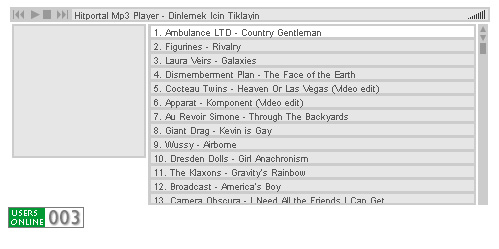
This Mp3 Player is free for use and very basic for your users 
.zip file contents:
xspf_player.as - actionscript file for your configuration.
xspf_player.swf - your player.
xspf_player.fla - for editing the player.
mp3player.html - your html page if you use popup
First of All edit your xspf_player.as and mp3player.html
You can use "http://hideout.com.br/shows/allshows.xspf" file for playlist.It contains 115 songs from other servers.So it doesnt use your bandwidth
How can you do your own playlists?
Here is an example:
Template Changes:
you can do it with a popup
in headinclude template find:
add above:
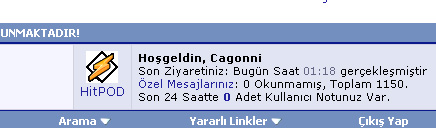
in navbar template:
The code you edit and write in template:
if you want only registered users see this player you can add the code above:
if you want guest see this player you can add the code above:
Here is a Demo : http://www.hitportal.net
Its my first thread sorry for mistakes
.zip file contents:
xspf_player.as - actionscript file for your configuration.
xspf_player.swf - your player.
xspf_player.fla - for editing the player.
mp3player.html - your html page if you use popup
First of All edit your xspf_player.as and mp3player.html
You can use "http://hideout.com.br/shows/allshows.xspf" file for playlist.It contains 115 songs from other servers.So it doesnt use your bandwidth
How can you do your own playlists?
Here is an example:
Code:
<?xml version="1.0" encoding="UTF-8" ?>
<playlist version="0" xmlns="http://xspf.org/ns/0/">
  <title>Hitportal Mp3 Player</title>
  <annotation>http://www.hitportal.net</annotation>
  <creator>Cagonni</creator>
  <info>http://webjay.org/by/hideout/allshows</info>
  <location>http://webjay.org/by/hideout/allshows.xspf</location>
  <license>http://creativecommons.org/licenses/by-sa/1.0/</license>
  <trackList>
<track>
<location>http://www.startimerecords.com/mp3s/supercuts/ambulance_countrygentleman.mp3</location>
<image>http://ec1.images-amazon.com/images/P/B000E8N8ZW.01._AA240_SCLZZZZZZZ_.jpg</image>
<annotation>Ambulance LTD - Country Gentleman</annotation>
<info>http://indoorfireworks.blogspot.com/2005_05_01_indoorfireworks_archive.html</info>
</track>
you can do it with a popup
in headinclude template find:
Code:
<script type="text/javascript" src="clientscript/vbulletin_global.js?v=$vboptions[simpleversion]"></script>
Code:
<script type="text/javascript">
function openpopup(popurl){
var winpops=window.open(popurl,"","width=500px,height=250px,status")
}
</script>
The code you edit and write in template:
Code:
	<td class="alt2" valign="top" nowrap="nowrap">
	<a href="javascript:openpopup('http://www.yoursite.com/mp3player.html')"><center><img src="winamp.gif" alt="Yoursite Mp3 Player" border="0"><br>Mp3 Player</a></center>
		</td>
Code:
<td class="alt2" valign="top" nowrap="nowrap">
		<div class="smallfont">
			<strong><phrase 1="$bbuserinfo[username]">$vbphrase[welcome_x]</phrase></strong><br />
<phrase 1="$pmbox[lastvisitdate]" 2="$pmbox[lastvisittime]">
if you want guest see this player you can add the code above:
Code:
<if condition="$show['member']">
td class="alt2" valign="top" nowrap="nowrap">
		<div class="smallfont">
			<strong><phrase 1="$bbuserinfo[username]">$vbphrase[welcome_x]</phrase></strong><br />
<phrase 1="$pmbox[lastvisitdate]" 2="$pmbox[lastvisittime]">
Its my first thread sorry for mistakes
Download
This modification is archived, downloads are still allowed.
 xspf_player-0.2.3.zip (220.4 KB, 130 downloads)
Screenshots