[BBCode] [urli] [aname] Content posts
Mod Version: 1.00, by Renee
This modification is in the archives.
| vB Version: 3.6.0 Beta 3 | Rating:  (1 vote - 5.00 average) (1 vote - 5.00 average) |
Installs: 26 |
| Released: 05 Jul 2006 | Last Update: Never | Downloads: 59 |
 Not Supported Not Supported
|
||
Tested on: vBulletin forum software version 3.5.4 and 3.6.0 Beta 4
*edit: seems to must be called showthread.php?t=id*
[aname="top"]Title[/aname]
[urli="#top]Top[/urli]
On 3.5.4 it works just with showthread.php?t=id :ermm:
What does this do?
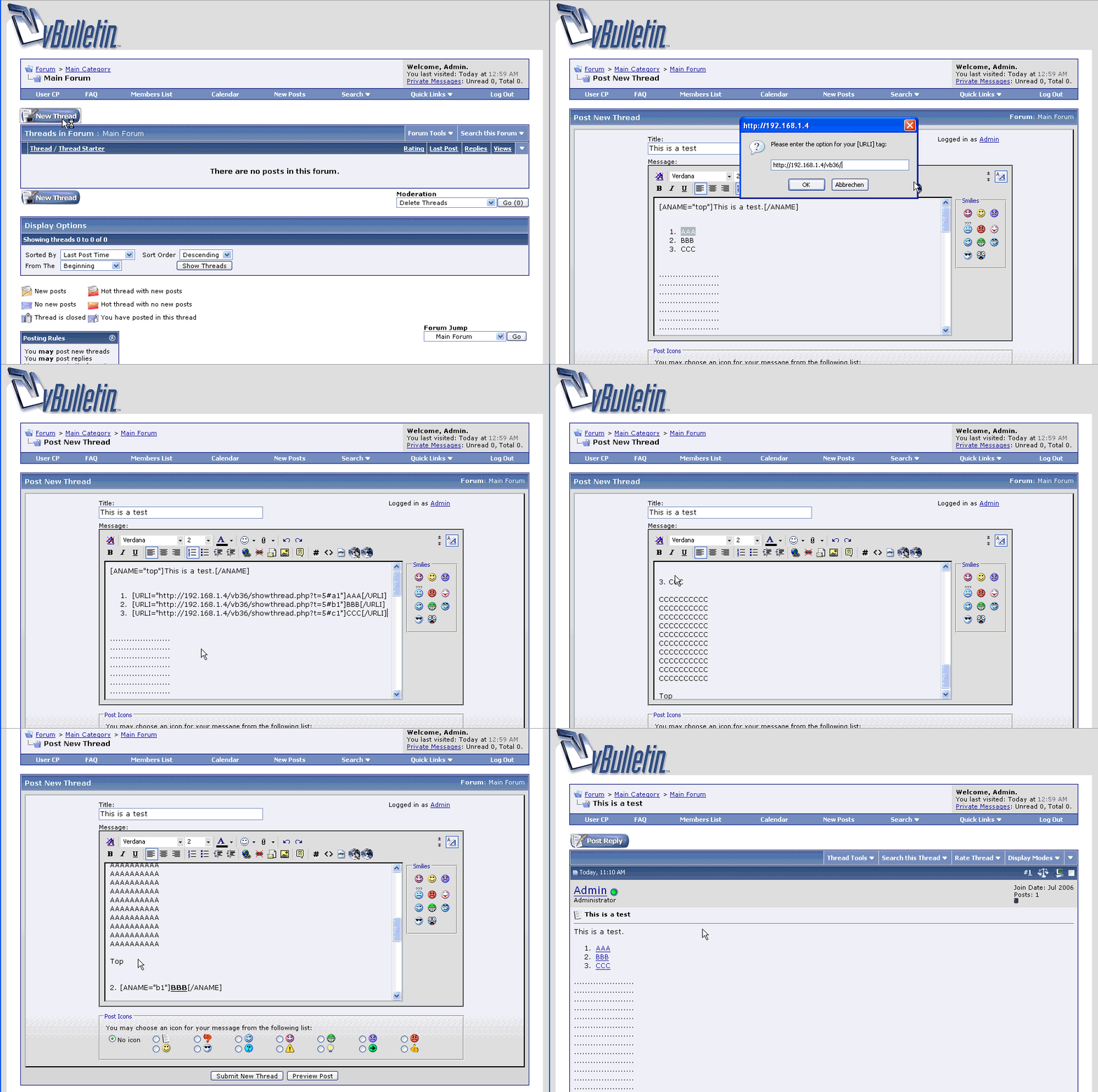
This will give the user the ability to write texts in contents like, or see the Example.gif
Example:
[urli=#top]Title[/urli]
[aname=top]Go to top[aname]
Installation instructions:
You're all done!
*edit: seems to must be called showthread.php?t=id*
Spoiler (click to open)
Quote by utw-Mephisto
On 3.6 it works for me with:But to be able to use it, does it mean I got to save the thread first to get the thread id (t=something) ?
[aname="top"]Title[/aname]
[urli="#top]Top[/urli]
On 3.5.4 it works just with showthread.php?t=id :ermm:
Close
What does this do?
This will give the user the ability to write texts in contents like, or see the Example.gif
Example:
[urli=#top]Title[/urli]
[aname=top]Go to top[aname]
Installation instructions:
Code:
FIRST STEP:
Admin Control Panel > Custom BB Codes > Add New BB
Title: Url name
Tag: aname
Replacement: <a name="{option}">{param}</a>
Example: [aname=http://my-forum.com]My Forum[/aname]
Use {option}: Yes
Button Image: /forum/images/editor/earth1.png (or whatever you want, can leave it too)
Save the new bbcode.
Code:
SECOND STEP:
Admin Control Panel > Custom BB Codes > Add New BB
Title: Url Link
Tag: urli
Replacement: <a href="{option}">{param}</a>
Example: [urli=http://my-forum.com]My Forum[/urli]
Use {option}: Yes
Button Image: /forum/images/editor/earth.png (or whatever you want, can leave it too)
Save the new bbcode.
Code:
THIRD STEP:
Admin Control Panel > Custom BB Codes > Add New BB
Title: Url Link
Tag: urli
Replacement: <a href="{option}">{param}</a>
Example: [urli=#top]Top[/urli]
Use {option}: Yes
Button Image (optional): /forum/images/editor/earth.png (or whatever you want, can leave it too)
Save the new bbcode.
Download
This modification is archived, downloads are still allowed.
 BBCode-Content.zip (522.8 KB, 154 downloads)
Screenshots