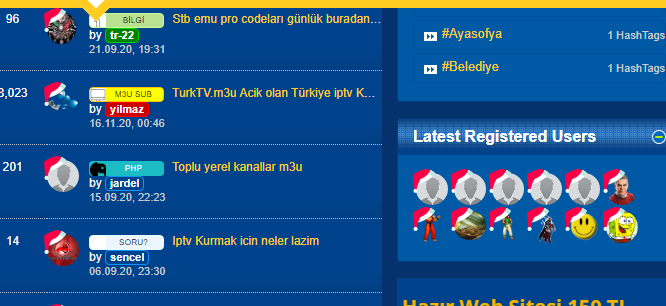
Add avatars santa hat with CSS vB5
Mod Version: 1.0.0, by yilmaz
| vB Version: 5.5.5 | Rating:  (1 vote - 5.00 average) (1 vote - 5.00 average) |
Installs: 7 |
| Released: 19 Dec 2020 | Last Update: Never | Downloads: 19 |
 Supported
Template Edits Supported
Template Edits
|
||
Description:
The simple and easy way to add a santa hat to all avatars.
How to install:
If you installed this mod and/or you want get support, please "Mark as Installed".
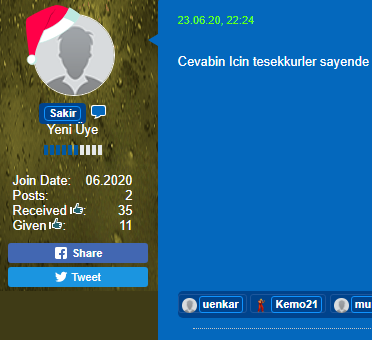
The simple and easy way to add a santa hat to all avatars.
How to install:
- Download the zip file, put the svg file named santahat.svg in the images folder in the root
- If you add the following CSS code to the css_additional.css template of the style you are using, it will look like the screenshot.
HTML Code:
/* Add Avatara Santa Hat with CSS start */
.avatar,
.b-avatar,
.b-avatar--thread {
border: 0;
}
.b-userinfo .b-avatar, .b-userinfo .b-avatar img {
max-height: 80px;
max-width: 80px !important;
width: 80px;
height: 80px;
}
.avatar img,
.avatar:not(.medium) > img,
.b-avatar:not(.b-avatar--m) > img,
.b-avatar--thread > img,
.b-avatar--s > img,
.b-comment .b-avatar img,
.b-comp-menu-dropdown__trigger-avatar,
.profile-sidebar-widget .profileContainer .profile-photo-wrapper .profile-photo,
.b-avatar--pmchat,
.b-pmchat__participants-avatar,
img.avatar,
img.b-avatar {
border-radius: 100%;
}
.avatar,
.b-avatar,
.b-avatar--thread {
border: 0;
	position: relative !important;
    overflow: visible !important;
}
.b-avatar--thread img {
border: 1px solid #fff;
}
.avatar:before,
.b-avatar:before,
.b-avatar--thread:before {
    content: ' ';
	background-image: url(/images/santahat.svg) !important;
	background-size: contain !important;
    background-repeat: no-repeat !important;
    width: 75% !important;
    height: 75% !important;
    position: absolute !important;
    top: -11% !important;
    left: -8% !important;
}
/* Add Avatara Santa Hat with CSS end */
Download
 santahat.zip (880 Bytes, 19 downloads)
Screenshots