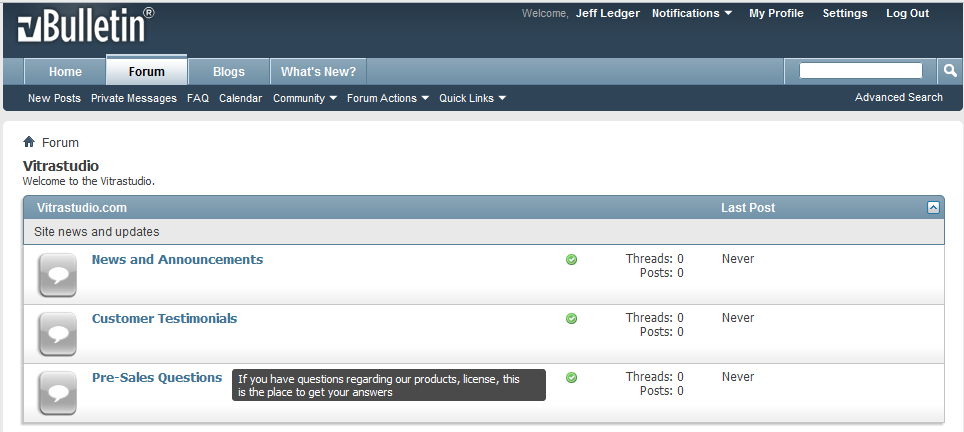
Facebook-like tooltip for forum descriptions
Mod Version: 1.00, by Jeff Ledger
| vB Version: 4.1.4 | Rating:  (3 votes - 5.00 average) (3 votes - 5.00 average) |
Installs: 19 |
| Released: 11 Jul 2011 | Last Update: Never | Downloads: 0 |
 Not Supported Not Supported
|
||
Hello guys,
Someone asked me to write this small mod for him and I decided to release it free for everybody here at vb.org.
I only use very small jquery and css to display it, then it won't do any effect to your site load.
Installation:
I. Add the following css in your additional.css
II. Add the following code at the bottom of your headinclude template
I'm using google api for jquery but of course, you can download it and reupload it to your site.
III. Open template forumhome_forumbit_level2_post
Find the following code
Change to
Find the following code
Remove it
Pretty simple huh ?
If you using it on your site, please to show your support.
More will come, I promised.
Regards,
Jeff Ledger
Someone asked me to write this small mod for him and I decided to release it free for everybody here at vb.org.
- If you are running a big board with a lot of forums. Especially someone who are using 2 column for display box in forumhome, you must meet the problems with display forum descriptions. Your layout will be look cleaner and nicer if all the box looks equal together.
- This mod remove the default descriptions and only dislay it on mouse-over (similiar to xenforo).
I only use very small jquery and css to display it, then it won't do any effect to your site load.
- Live demo: http://vitrastudio.com
http://www.thevbexperts.com - Screenshot: attachments
- Brought to you by vitrastudio.com
Installation:
I. Add the following css in your additional.css
Code:
.tip {
    background: none repeat scroll 0 0 #1D1D1D;
    color: #FFFFFF;
    display: none;
    font-size: 11px;
    font-weight: normal;
    margin-left: 10px;
    padding: 3px 7px;
    position: absolute;
    width: 300px;
    z-index: 1000;
    -webkit-border-radius: 3px;
    -moz-border-radius: 3px;
    border-radius: 3px;
  -ms-filter: "progid:DXImageTransform.Microsoft.Alpha(Opacity=80)";
  filter: alpha(opacity=80);
  -moz-opacity: 0.8;
  -khtml-opacity: 0.8;
  opacity: 0.8;
}
Code:
<script type="text/javascript" src="http://ajax.googleapis.com/ajax/libs/jquery/1.4.2/jquery.min.js"></script>
<script type="text/javascript">
$(document).ready(function() {
    //Tooltips
    $(".tip_trigger").hover(function(){
        tip = $(this).find('.tip');
        tip.show(); //Show tooltip
    }, function() {
        tip.hide(); //Hide tooltip
    }).mousemove(function(e) {
        var tipWidth = tip.width(); //Find width of tooltip
        var tipHeight = tip.height(); //Find height of tooltip
        //Distance of element from the right edge of viewport
        var tipVisX = $(window).width() - (mousex + tipWidth);
        //Distance of element from the bottom of viewport
        var tipVisY = $(window).height() - (mousey + tipHeight);
        if ( tipVisX < 20 ) { //If tooltip exceeds the X coordinate of viewport
            mousex = e.pageX - tipWidth - 20;
        } if ( tipVisY < 20 ) { //If tooltip exceeds the Y coordinate of viewport
            mousey = e.pageY - tipHeight - 20;
        }
        //Absolute position the tooltip according to mouse position
        tip.css({  top: mousey, left: mousex });
    });
});
</script>
III. Open template forumhome_forumbit_level2_post
Find the following code
Code:
<h2 class="forumtitle"><a href="{vb:link forum, {vb:raw forum}}">{vb:raw forum.title}</a></h2>
Code:
<h2 class="forumtitle"><a title="" class="tip_trigger" style="" href="{vb:link forum, {vb:raw forum}}">{vb:raw forum.title}<span class="tip"><vb:if condition="$show['forumdescription']"><p class="forumdescription">{vb:raw forum.description}</p></vb:if></span></a></h2>
Code:
<vb:if condition="$show['forumdescription']"><p class="forumdescription">{vb:raw forum.description}</p></vb:if>
Pretty simple huh ?
If you using it on your site, please to show your support.
More will come, I promised.
Regards,
Jeff Ledger
Download
No files for download.
Screenshots